Moz Local Review 2026
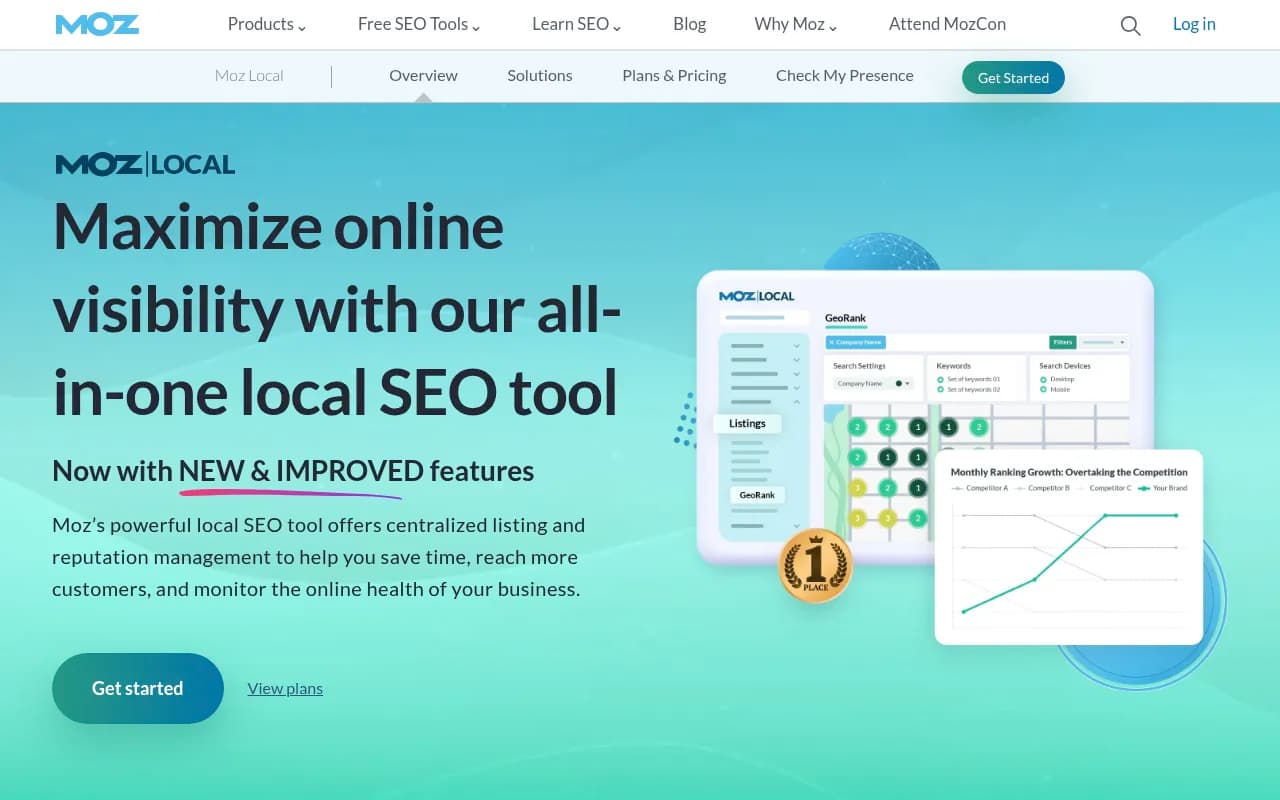
Moz Local is a local SEO platform that syncs business listings across 90+ directories, tracks map pack rankings with Local Grid, and centralizes review management and social posting. Built for small businesses, agencies, and multi-location brands who need listing accuracy without juggling a dozen da
Key takeaways
- Moz Local syncs NAP data (name, address, phone) across 90+ directories and data aggregators, then layers on review monitoring, review responding (Google and Facebook only), and social posting from one dashboard.
- The December 2024 relaunch added real features: Local Grid rank tracking (a renamed, upgraded GeoRank), Listings AI, Reviews AI, and review sentiment analysis, moving Moz Local closer to a full reputation-management suite instead of a plain listing syncer.
- Pricing starts at $16/mo (Lite, billed yearly) and tops out at $33/mo (Elite, billed yearly) per location, which undercuts BrightLocal and Yext on entry price, though AI features are metered as add-ons on the lower tiers.
- Review responding is still capped at Google and Facebook even on the top consumer plan, and Canadian listing data has been reported as thin by at least one long-time user, so verify coverage for your market before committing.
- This is a local-listings and reputation tool, not an AI search visibility platform. If you're trying to track brand mentions inside ChatGPT or Google AI Overviews, that's a different category of product entirely.
Moz built its name on link metrics and Domain Authority, but Moz Local is a separate, narrower product aimed at a very specific pain point: keeping a business's name, address, and phone number consistent across the sprawling mess of directories, maps, and apps that feed local search. It's built and sold by Moz (part of Ziff Davis) and has been around in some form since 2014, but it got a substantial overhaul in December 2024 that repositioned it as a combined listings, reputation, and social media management platform rather than a pure syncing tool.
The target audience splits cleanly into two camps. On one end, single-location small businesses -- dentists, restaurants, auto shops -- who just want their Google Business Profile and Yelp listing to say the same thing and don't want to think about it again. On the other end, agencies and multi-location brands managing dozens or hundreds of storefronts, where "Agency Permissions" and bulk workflows matter more than any individual feature. Moz explicitly carves out an Enterprise tier for businesses running 50+ locations, which tells you where the serious money in this product actually sits.
Key features
- Listing distribution and sync. Moz Local pushes your business data out to more than 90 directories, search engines, apps, and data aggregators, including the obvious ones like Google Business Profile, Facebook, Bing, and Yelp. This is the core function the product was originally built for, and it still works the way you'd expect: enter your data once, Moz Local keeps it synced everywhere on an ongoing basis rather than a one-time push.
- Data Health analytics. A dashboard view showing which listings are missing fields, which need action, and which are already fully updated. It's the kind of feature that sounds boring until you're managing 40 locations and realize three of them have the wrong phone number on Apple Maps.
- Local Grid rank tracking. Formerly branded "GeoRank," this is an interactive map-grid tool showing exactly where your business ranks in the local pack across different points on a map, not just a single average position. You can see how rankings shift by neighborhood and compare against named competitors at the same granularity. This is a meaningful upgrade from Moz Local's older, thinner rank-tracking story and closes a gap that used to be a real weakness versus BrightLocal.
- Review monitoring and responding. Reviews across multiple networks flow into one dashboard, but actual in-app responding only works for Google and Facebook, even on the top-tier Elite plan. If you need to respond to Yelp or TripAdvisor reviews from inside the tool, you're out of luck; you'll still need to hop over to those platforms directly.
- Reviews AI and review sentiment analysis. Reviews AI drafts suggested responses referencing specifics from the actual customer feedback, rather than generic templates. Sentiment analysis tracks rating trends by platform over time, available from the Preferred tier up. Both are useful for spotting patterns (say, consistent complaints about wait times) without manually reading every review.
- Listings AI. Generates recommendations for profile updates based on rankings, competitor data, and engagement signals. It's bundled free into Elite but costs $14/mo or $119/yr as an add-on on Lite and Preferred, which feels like an odd place to gate a feature that's meant to save you time on the plans where you have the least time to spare.
- Social media management. Scheduling and posting to Google and Facebook is available from Preferred up; Elite adds Instagram, LinkedIn, and TikTok, plus Facebook ad boosting and social inbox responding. It's a genuine expansion of scope beyond "local SEO tool" into something closer to a lightweight social media manager, though it's clearly secondary to the listings and reviews functions.
- GBP Insights integration. Pulls Google Business Profile interaction data, calls, direction requests, website clicks, directly into the Moz Local dashboard so you're not tabbing over to Google's own interface to see performance.
- Competitor analysis. Available from Preferred tier up, letting you compare your review counts, ratings, and rankings against named local competitors rather than guessing at your relative position.
Who is it for
Single-location small businesses that need their listings to be accurate and don't want to manage this manually across ten different directory login pages are the clearest fit, especially at the Lite tier's $16/mo entry price. A local HVAC company or a two-chair barbershop gets real value here without needing rank-tracking depth or social scheduling.
Agencies managing a portfolio of small business clients are the other obvious fit, particularly with Agency Permissions unlocked at Preferred and above. One G2 reviewer running an agency-style account flagged billing and account management friction as a pain point, so larger agencies should budget time for onboarding and be prepared to push back on invoicing if something looks off.
Multi-location brands with 50+ locations should go straight to the Enterprise tier and talk to sales rather than trying to force-fit the consumer plans, since Enterprise includes dedicated account management and expanded directory coverage that the self-serve tiers don't offer. Businesses that need review responding across platforms beyond Google and Facebook, or that operate heavily in markets like Canada where at least one reviewer reported thin data coverage, should test the free elements or talk to support before committing to an annual plan.
Integrations and ecosystem
Moz Local's integration story is mostly about the directories and platforms it distributes to and pulls data from: Google Business Profile, Facebook, Bing, Apple Maps, Yelp, and a longer tail of data aggregators that Moz doesn't publicly name in full (you see the specific list per location inside your own dashboard). Social publishing integrations cover Google and Facebook broadly, with Instagram, LinkedIn, and TikTok reserved for the Elite tier.
There's no public API for Moz Local specifically, and no dedicated GitHub presence, unlike Moz's separate API product (Moz API, which covers link and domain metrics, not local listings). Moz Local doesn't have its own browser extension or mobile app distinct from the Moz brand; it's accessed through the web dashboard. If you need programmatic access to local ranking or listing data, this isn't the product, and you'd be better served checking a directory like surferstack.com for tools built with API-first access in mind.
Pricing and value
Moz Local runs three self-serve tiers plus a custom Enterprise option:
- Lite: $20/mo monthly or $16/mo ($199 billed yearly). Includes Local Grid rank tracking, 90+ directory listings, review monitoring, and Data Health analytics. Listings AI is a $14/mo ($119/yr) add-on.
- Preferred (Moz's "most popular" tag): $30/mo monthly or $24/mo ($299 billed yearly). Adds review responding on Google and Facebook, sentiment analysis, social posting/analytics, content libraries, competitor analysis, and agency permissions. Listings AI add-on drops to $119/yr (save $49); Reviews AI add-on runs $69/yr (save $51).
- Elite: $40/mo monthly or $33/mo ($399 billed yearly). Listings AI is bundled in for free; adds Instagram/LinkedIn/TikTok posting, Facebook ad boosting, social inbox responding, and full reporting. Reviews AI is still a paid add-on at this tier.
- Enterprise: Custom pricing for 50+ locations, with a dedicated account manager and expanded directory access.
Against competitors, this is priced aggressively. BrightLocal starts around $39/mo per location and Yext's entry tier runs roughly $199/year per location, so Moz Local's $16-$33/mo range is genuinely cheaper on paper. The catch is that Moz Local's AI features are add-ons rather than included, which can erode that price advantage once you start stacking them onto Lite or Preferred. For straightforward listing management without heavy AI reliance, the value is solid; for agencies wanting AI-drafted review responses and profile optimization included by default, Elite is really the tier to buy.
Strengths and limitations
What it does well: listing distribution across a genuinely wide directory network, a Data Health view that makes gaps easy to spot at a glance, and a Local Grid rank tracker that's a real improvement over the product's older, thinner rank-tracking story. The Dec 2024 relaunch also meaningfully broadened scope into reputation and social management without turning the interface into a mess, based on the feature list and user ratings (4.2/5 on G2 from 475 reviews, 4.4/5 on Capterra).
Where it falls short: review responding inside the app is limited to Google and Facebook even at the top consumer tier, so multi-platform reputation management still requires stepping outside the tool for networks like Yelp or TripAdvisor. Billing and account management complaints show up in G2 reviews, with one enterprise-level reviewer specifically calling out unreadable invoicing and unresponsive account managers. And at least one longtime Capterra reviewer flagged sparse data coverage for Canada, which is worth testing directly if you operate outside the US.
Bottom line
Moz Local is a solid, reasonably priced choice for small businesses and agencies that need accurate, synced listings plus a workable reputation-management layer, and the December 2024 relaunch closed real gaps in rank tracking and reviews that used to make it feel thin compared to BrightLocal. It's best used as the listings-and-reviews backbone for single-location businesses or agencies managing a roster of similar-sized clients, not as a heavyweight enterprise local SEO platform on its own.
Tags:
Frequently asked questions
What is Moz Local used for?
How much does Moz Local cost?
Does Moz Local respond to reviews automatically?
Is Moz Local good for agencies managing multiple clients?
How does Moz Local compare to BrightLocal or Yext?
Is there a free version of Moz Local?
Similar and alternative tools to Moz Local