Pipedrive Review 2026
Sales CRM tool designed for pipeline visualization and deal tracking, with automation features to help teams close more deals efficiently.
Summary
- Best for: Small to mid-sized sales teams (2-50 reps) who need a visual, easy-to-adopt CRM that focuses on pipeline management and deal progression rather than bloated feature sets
- Standout strength: The kanban-style pipeline view makes it dead simple to see where every deal stands and what needs to happen next -- no training required
- Limitation: Lacks advanced marketing automation and customer service features that all-in-one platforms like HubSpot or Salesforce offer
- Pricing: Starts at $14/user/month (Essential plan) with a 14-day free trial -- significantly cheaper than enterprise CRMs while still delivering core sales functionality
Pipedrive is a sales CRM built by salespeople who were tired of clunky, over-engineered systems. Founded in 2010 by a team of Estonian entrepreneurs (including Timo Rein, who previously built a sales software company), it emerged from frustration with existing CRMs that felt like they were designed for IT departments, not sales reps. The core insight: most CRMs fail because they're too complicated and reps don't actually use them. Pipedrive flipped that by building around a visual pipeline that mirrors how salespeople actually think about their work.
Today it's used by over 100,000 companies across 179 countries -- from solo consultants to teams of 50+ reps. The user base skews heavily toward SMBs and mid-market companies in industries like SaaS, professional services, real estate, and agencies. It's particularly popular with teams that have defined sales processes but don't need the enterprise complexity (or price tag) of Salesforce.
Visual Pipeline Management
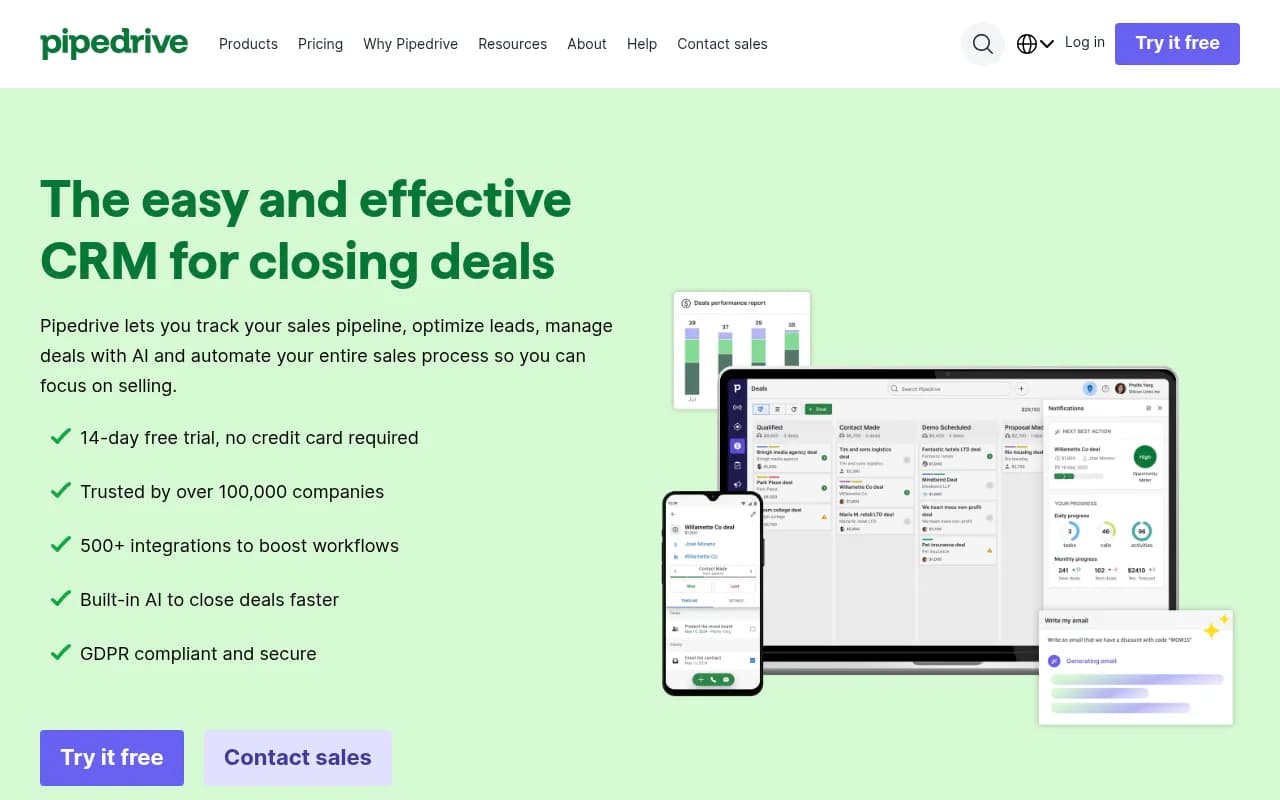
The core of Pipedrive is its kanban-style pipeline view. You see deals as cards arranged in columns representing stages (Qualified, Demo Scheduled, Proposal Sent, Negotiation, Closed Won, etc.). Drag a deal from one stage to the next as it progresses. It's intuitive enough that new reps can start using it in minutes without formal training.
You can create multiple pipelines for different sales processes -- one for new business, another for renewals, a third for partnerships. Each pipeline has customizable stages, and you can set probability percentages for each stage to improve forecasting accuracy. The system automatically calculates weighted revenue based on deal value and stage probability.
Custom fields let you capture whatever data matters to your process -- industry, company size, lead source, competitor mentions, decision-maker role, budget authority. You can create formula fields that auto-calculate values (like deal margin or days in stage). The flexibility is there without overwhelming you with options.
Activity-Based Selling
Pipedrive is built around the idea that sales success comes from consistent activity, not just tracking deal values. Every deal has an associated "next activity" -- a call, email, meeting, or task that needs to happen to move it forward. The system nags you (in a good way) to schedule that next activity, and surfaces overdue tasks prominently.
The calendar view shows all your scheduled activities across deals. Two-way email sync (connects up to 5 email accounts) means you can send and receive emails directly in Pipedrive, with full conversation history attached to the deal. Email tracking tells you when prospects open your messages or click links. Templates let you save and reuse common email formats.
Call scheduling is built in -- share your availability link with prospects and they can book time directly on your calendar. It auto-generates meeting links for Zoom, Google Meet, or Microsoft Teams. No more back-and-forth email tennis trying to find a time.
Sales Automation & AI Features
Workflow automation lets you eliminate repetitive tasks. Set up triggers like "when a deal moves to Demo Scheduled stage, create a task to send a calendar invite and add a note with demo prep questions." Or "when a lead is marked as qualified, automatically create a deal and assign it to the rep who owns that territory." You can build these from scratch or use pre-made templates.
Lead routing is particularly useful for teams -- automatically assign incoming leads based on custom rules (territory, company size, lead source, round-robin rotation). As deals progress through stages, you can auto-reassign them from SDRs to AEs to account managers.
The AI Sales Assistant (available on higher-tier plans) analyzes your pipeline and surfaces insights: which deals are most likely to close, which are at risk of stalling, which leads you should prioritize. It learns from your historical data to make predictions. The AI email writer helps you draft responses faster by suggesting content based on the context of the conversation.
Reporting & Forecasting
Real-time dashboards show pipeline health, conversion rates by stage, average deal size, sales cycle length, and rep performance. You can drill down into individual metrics or view team-wide trends. Goal tracking lets you set targets (monthly revenue, number of deals closed, activities completed) and monitor progress visually.
Revenue forecasting uses weighted pipeline values (deal amount × stage probability) to predict future earnings. You can forecast by time period, by rep, or by product line. Recurring revenue tracking is built in for subscription businesses.
The Insights feature (Professional plan and up) provides deeper analytics: which lead sources convert best, which activities correlate with closed deals, where deals get stuck in your pipeline. It's not as robust as dedicated BI tools, but it's more than enough for most SMB sales teams.
Integrations & Ecosystem
Pipedrive's Marketplace has 500+ integrations covering lead generation (LinkedIn Sales Navigator, Hunter.io, Leadfeeder), communication (Slack, Microsoft Teams, WhatsApp), marketing (Mailchimp, ActiveCampaign), accounting (QuickBooks, Xero), project management (Asana, Trello), and more. Zapier and Make (formerly Integromat) support extends this to thousands of additional apps.
The API is well-documented and RESTful, making it relatively easy for developers to build custom integrations or pull data into other systems. Webhooks let you trigger actions in external systems when events happen in Pipedrive.
Mobile apps for iOS and Android are solid -- you can update deals, log activities, and check your pipeline on the go. The interface is simplified but functional. Sales reps who spend a lot of time in the field or traveling between meetings appreciate being able to update the CRM immediately after a call.
Who Is It For
Pipedrive is built for small to mid-sized B2B sales teams (roughly 2-50 reps) with defined sales processes. It shines for:
- SaaS companies with 5-20 salespeople doing outbound prospecting and demo-driven sales cycles
- Agencies (marketing, web design, consulting) tracking multiple client opportunities simultaneously
- Professional services firms (legal, accounting, recruiting) managing long sales cycles with multiple touchpoints
- Real estate teams juggling dozens of property deals at various stages
- Distributors and wholesalers managing B2B relationships and repeat orders
It's particularly good for teams transitioning from spreadsheets or basic tools who want something more powerful but not overwhelming. The visual pipeline and activity focus make adoption easy -- reps actually use it instead of treating it as a reporting burden.
It's NOT ideal for:
- Enterprise sales teams (100+ reps) needing complex territory management, multi-level approval workflows, or deep Salesforce-style customization
- Companies wanting all-in-one marketing automation -- Pipedrive does sales well but lacks the email campaign builders, landing page creators, and marketing analytics that HubSpot or ActiveCampaign provide
- Customer service-heavy businesses -- there's no built-in ticketing system or customer support portal (though you can integrate with Zendesk or Intercom)
- Teams needing advanced CPQ (configure-price-quote) for complex product catalogs with dynamic pricing rules
Pricing & Value
Pipedrive uses per-user, per-month pricing with four tiers (billed annually for these rates):
- Essential ($14/user/month): Core pipeline management, 3,000 open deals, email integration, mobile app, 30+ reports. Good for solo sellers or very small teams just getting started.
- Advanced ($29/user/month): Unlimited deals, email tracking and templates, workflow automation, meeting scheduler, group emailing, 150+ reports. This is the sweet spot for most small teams.
- Professional ($59/user/month): AI Sales Assistant, revenue forecasting, team management features, custom fields, advanced permissions, 400+ reports. Best for growing teams (10-30 reps) that need forecasting and AI insights.
- Power ($79/user/month): Projects feature (manage implementation/onboarding), account management tools, enhanced security, phone support. For teams managing complex post-sale processes.
- Enterprise (custom pricing): Unlimited customization, dedicated account manager, advanced security and compliance, priority support. For larger organizations (50+ users) with specific requirements.
All plans include the 500+ integrations and 14-day free trial (no credit card required). Monthly billing is available but costs more (roughly 20-30% premium over annual).
Compared to competitors: Salesforce starts around $25/user/month but realistically costs $75-150/user/month once you add necessary features. HubSpot Sales Hub starts at $20/user/month (Professional tier is $100/user/month). Zoho CRM starts at $14/user/month but feels clunkier. Close CRM is $49-99/user/month with similar features. Pipedrive sits in the affordable-but-capable zone -- you're not paying for enterprise bloat you don't need.
The value proposition is strong for SMBs: you get a polished, intuitive CRM that reps will actually use, with enough automation and reporting to scale from 5 to 50 users without outgrowing it. The AI features at the Professional tier ($59/user/month) are legitimately useful, not just marketing fluff.
Strengths
- Adoption is effortless: The visual pipeline and activity-based approach match how salespeople naturally think. New reps are productive within hours, not weeks.
- Focused feature set: Pipedrive doesn't try to be everything -- it does sales pipeline management exceptionally well without the feature bloat that makes other CRMs overwhelming.
- Automation that actually works: Workflow automation is powerful enough to eliminate real busywork (auto-assigning leads, triggering follow-up tasks, updating deal stages) but simple enough to set up without a developer.
- Pricing transparency: No hidden fees, no forced add-ons. You know exactly what you're paying and what you get at each tier.
- Strong mobile experience: The iOS and Android apps are genuinely usable, not afterthoughts. Reps can update deals and log activities from anywhere.
Limitations
- No built-in marketing automation: If you want email campaigns, landing pages, or lead scoring, you'll need to integrate with Mailchimp, ActiveCampaign, or HubSpot. Pipedrive is sales-focused, not a full marketing platform.
- Limited customer service features: There's no ticketing system, knowledge base, or customer portal. If post-sale support is a big part of your business, you'll need to add Zendesk or Intercom.
- Reporting could be deeper: The built-in reports are solid for most SMBs, but if you need complex custom reports or advanced BI, you'll want to export data to Looker, Tableau, or Power BI.
- Customization has limits: You can add custom fields and adjust pipelines, but you can't fundamentally change the data model or create custom objects like you can in Salesforce. For 95% of teams this isn't an issue, but enterprise buyers with unique requirements may hit walls.
Bottom Line
Pipedrive is the CRM for sales teams that want to actually sell instead of fighting with software. If you're a small to mid-sized B2B team (5-50 reps) with a defined sales process, and you value ease of use and adoption over enterprise-grade customization, Pipedrive is probably your best option. The visual pipeline, activity focus, and workflow automation hit the sweet spot between simplicity and power.
Best use case in one sentence: B2B sales teams (5-30 reps) doing outbound prospecting and demo-driven sales who need a CRM that reps will actually use without constant nagging from management.
Frequently asked questions
What is Pipedrive used for?
How much does Pipedrive cost?
Is Pipedrive free to use?
Who is Pipedrive best for?
What are the main features of Pipedrive?
How does Pipedrive compare to HubSpot?
How does Pipedrive compare to Salesforce?
Does Pipedrive have a free trial?
Who created Pipedrive and when was it founded?
What are the limitations of Pipedrive?
How many companies use Pipedrive?
Does Pipedrive offer sales automation features?
Similar and alternative tools to Pipedrive