Hootsuite Review 2026
Manage multiple social accounts with scheduling, content creation, analytics, and social listening capabilities from a single dashboard.
Summary
- Best for: Social media managers, marketing teams, agencies, and enterprises managing multiple social accounts across platforms
- Standout strength: Unified dashboard that consolidates scheduling, engagement, analytics, listening, and AI content creation in one place
- Honest limitation: Pricing can get expensive for teams needing advanced features or managing many accounts
- Bottom line: The industry standard for social media management, especially for teams juggling multiple brands or clients
Hootsuite has been around since 2008, making it the OG of social media management platforms. Over 25 million users have relied on it to wrangle their social presence, and it's still the go-to for a reason: it actually works. The platform brings together everything you need to run social media professionally -- scheduling, engagement, analytics, listening, and now AI-powered content creation -- without forcing you to hop between a dozen browser tabs.
The core pitch is simple: manage all your social accounts from one dashboard. In practice, that means connecting Facebook, Instagram, Twitter/X, LinkedIn, TikTok, Pinterest, YouTube, and more, then handling everything from post scheduling to customer service to performance tracking in a single interface. For anyone managing more than two social accounts (or managing them for multiple clients), this consolidation is the entire point.
Publishing and scheduling
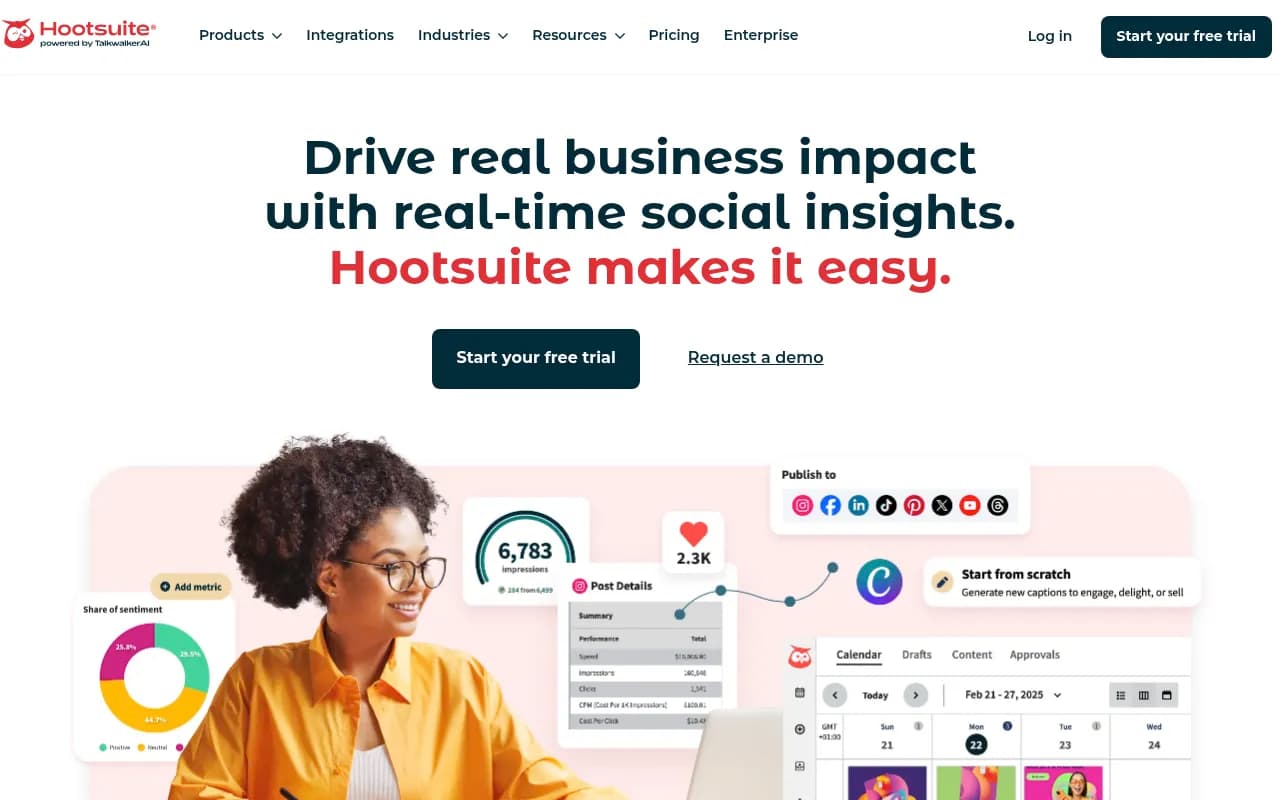
Hootsuite's content calendar is the heart of the platform. You can schedule posts weeks or months in advance, bulk upload content via CSV, and visualize your entire posting schedule in a drag-and-drop calendar view. The platform shows you the best times to post for each network based on when your audience is most active, which beats guessing or manually checking analytics.
The Canva integration is built directly into the composer, so you can create graphics using Canva templates without leaving Hootsuite. There's also a stock photo library and the ability to save drafts, create approval workflows (on higher-tier plans), and customize captions per network when cross-posting. The link-in-bio tool (Hootbio) lets you create a landing page with multiple links for Instagram and TikTok.
Bulk scheduling is a huge time-saver for agencies or brands that batch-create content. Upload a CSV with post text, images, and scheduled times, and Hootsuite queues everything up. You can also set up post templates for recurring content types.
AI content creation (OwlyWriter AI)
Hootsuite's AI assistant, OwlyWriter, generates captions, hashtags, video scripts, and creative briefs based on prompts or trending topics. You can feed it a URL and it'll draft a post about that content, or ask it to repurpose an existing post for a different platform. The AI also suggests post ideas based on what's trending in your industry, pulling from Hootsuite's social listening data.
The quality is solid for first drafts -- it won't replace a skilled copywriter, but it's faster than staring at a blank text box. You can set brand voice guidelines so the AI matches your tone. The AI also powers suggested replies in the inbox, which speeds up customer service.
Unified inbox and engagement
The Inbox consolidates DMs and comments from all connected networks into a single feed. You can filter by platform, assign messages to team members, add internal notes, and mark conversations as resolved. Saved replies let you create templates for common questions, and the AI can suggest replies based on message context.
For Instagram, Hootsuite offers automated DM responses triggered by keywords or story mentions. This is useful for lead capture (e.g., someone comments "interested" and gets an auto-DM with a link). The inbox also supports message routing, so customer service questions can go to one team member while partnership inquiries go to another.
The main limitation: you can't handle Instagram Story replies or some newer features like Instagram Notes from Hootsuite. You'll still need the native app for those.
Analytics and reporting
Hootsuite tracks hundreds of metrics across all connected accounts: follower growth, engagement rate, reach, impressions, clicks, video views, and more. You can create custom reports by dragging and dropping metrics, then schedule them to auto-generate and email to stakeholders weekly or monthly.
The platform includes competitor benchmarking, so you can see how your engagement rate or follower growth stacks up against similar accounts. Best time to post reports analyze when your audience is most active and engaged. Paid and organic performance are tracked separately, which is critical for understanding ROI.
Report templates cover common use cases (executive summary, campaign performance, platform-specific deep dives), and you can export to PDF, PowerPoint, or CSV. The Looker Studio integration lets you pull Hootsuite data into custom dashboards.
One gap: Hootsuite's analytics are strong for engagement and reach but less detailed for conversion tracking. If you need to tie social posts to revenue, you'll want to connect Google Analytics or your CRM.
Social listening and monitoring
Hootsuite's listening tools (available on Professional and higher plans) let you track brand mentions, hashtags, keywords, and competitor activity across social networks and the web. You can set up streams to monitor specific topics in real time, then jump into conversations or save posts for later.
Sentiment analysis shows whether mentions are positive, negative, or neutral, and you can track sentiment trends over time. The platform also surfaces trending topics in your industry, which feeds into content ideation. If you're tracking a campaign hashtag or event, you can see all related posts in one stream.
The listening data integrates with OwlyWriter AI, so you can ask the AI to draft posts about trending topics it's detected. This closes the loop between monitoring and content creation.
Hootsuite's listening isn't as deep as dedicated tools like Brandwatch or Sprout Social's listening module, but it's more than adequate for most teams. You won't get the same level of demographic analysis or advanced filtering, but you'll catch the important conversations.
Employee advocacy (Hootsuite Amplify)
Amplify is Hootsuite's employee advocacy platform, designed to turn employees into brand ambassadors. Admins curate content for employees to share on their personal social accounts, and the platform tracks reach and engagement from those shares. The pitch: audiences trust people more than brands, so employee shares get 10x the reach and 8x the engagement of corporate posts.
This is particularly useful for B2B companies, recruiting, and thought leadership. Sales teams can share product updates, HR can amplify job postings, and executives can share company news. Employees get a mobile app with pre-approved content they can share in one tap.
Amplify is sold as an add-on or standalone product, not included in standard Hootsuite plans. Pricing is custom based on company size.
Integrations and ecosystem
Hootsuite connects to over 100 third-party tools, more than any other social media management platform. Key integrations include:
- Canva: Create graphics directly in the Hootsuite composer
- Google Analytics: Track social traffic and conversions
- Slack: Get notifications for mentions or messages
- Salesforce, HubSpot, Marketo: Sync social data with your CRM
- Dropbox, Google Drive: Access files for social posts
- Zapier: Connect Hootsuite to thousands of other apps
- Brandwatch, Talkwalker: Enhanced social listening
The Hootsuite App Directory lets you browse and install integrations. There's also a REST API for custom integrations, though it's primarily used by enterprise customers and developers.
Who is it for
Hootsuite is built for professional social media management, not casual personal use. The sweet spot is:
- Social media managers at mid-size to large companies managing 5-20+ social accounts across brands or regions
- Marketing teams that need collaboration features like approval workflows, role-based permissions, and shared content libraries
- Agencies managing social media for multiple clients, especially those needing white-label reporting and client-specific dashboards
- Enterprises with complex org structures, multiple brands, and strict security/compliance requirements
Small businesses and solopreneurs can use Hootsuite, but the pricing and feature set might be overkill. If you're managing 1-3 accounts and don't need advanced analytics or team collaboration, simpler tools like Buffer or Later might be a better fit.
Hootsuite is less ideal for:
- Influencers or creators focused on Instagram/TikTok growth -- tools like Planoly or Plann are more creator-focused
- Teams on a tight budget -- Hootsuite's pricing is higher than competitors like Buffer or Zoho Social
- Users who need deep Instagram analytics -- native Instagram Insights or Later's analytics are more detailed
Pricing and plans
Hootsuite offers three main tiers:
- Standard: $39/month per user. Up to 10 social accounts, unlimited post scheduling, basic analytics, unified inbox. Good for small teams or solo managers.
- Advanced: $99/month per user. Up to 20 social accounts, advanced analytics, competitor benchmarking, saved replies, message routing. Best for growing teams.
- Enterprise: Custom pricing. Unlimited social accounts, advanced security, dedicated support, custom integrations, employee advocacy (Amplify). For large organizations.
All plans include a 30-day free trial. Annual billing gets you a discount (typically 2 months free). Additional users cost the per-user rate, and you can add more social accounts for an extra fee on Standard and Advanced plans.
Add-ons include:
- Social listening: Starts around $99/month, included in Enterprise
- AI chatbot: Custom pricing, automates customer service responses
- Amplify (employee advocacy): Custom pricing based on company size
Nonprofits get a 50% discount on Standard and Advanced plans.
Compared to competitors: Hootsuite is more expensive than Buffer ($6-12/month per channel) and Zoho Social ($15-65/month per brand), but cheaper than Sprout Social ($249-499/month per user). You're paying for the depth of features, integrations, and enterprise-grade reliability.
Strengths
- Unified dashboard: Managing 10+ social accounts from one interface is genuinely easier than juggling native apps or multiple tools
- Scheduling flexibility: Bulk upload, best time to post, approval workflows, and a visual calendar make content planning efficient
- Integration ecosystem: 100+ integrations mean Hootsuite fits into almost any tech stack
- Social listening: Monitoring brand mentions and trending topics in the same platform you use for posting is convenient
- Established platform: 18 years in business means Hootsuite has seen every social media curveball and adapted
Limitations
- Pricing: Hootsuite is pricier than Buffer, Later, or Zoho Social, especially once you add users or accounts. Small teams might find it hard to justify.
- Learning curve: The interface is powerful but dense. New users often feel overwhelmed by the number of features and settings.
- Instagram limitations: You can't reply to Instagram Story mentions or handle some newer features from Hootsuite. You'll still need the native app for full functionality.
- Analytics depth: While Hootsuite's analytics are solid for engagement and reach, they're not as detailed as Sprout Social or native platform insights for conversion tracking.
Bottom line
Hootsuite is the industry standard for a reason: it handles the full scope of professional social media management in one place. If you're managing multiple accounts, working with a team, or running social for clients, Hootsuite's combination of scheduling, engagement, analytics, and listening is hard to beat. The AI content tools and employee advocacy features are nice bonuses that competitors don't always offer.
The pricing is higher than simpler alternatives, but you're paying for depth and reliability. For agencies, enterprises, or marketing teams that live in social media, Hootsuite is worth the investment. For small businesses or solo creators, it might be more tool than you need.
Best use case in one sentence: Marketing teams and agencies managing 5+ social accounts across multiple brands or clients who need scheduling, engagement, analytics, and listening in a single platform.
Tags:
Similar and alternative tools to Hootsuite