Close CRM Review 2026
Sales-focused CRM designed for teams that prioritize speed and efficiency, featuring automation tools to accelerate deal closing.
Key Takeaways
- Built for speed: Close performs 50% faster than Pipedrive, HubSpot, and Salesforce in head-to-head tests, with a UI designed for rapid lead-to-close workflows
- All-in-one communication: Call, email, and text directly from the CRM with automatic activity logging—no need to juggle Zoom, Gmail, and a separate dialer
- AI that actually helps: Transcribes calls, enriches leads with real-time web data, summarizes activity, and rewrites emails—without requiring separate tools or subscriptions
- Honest limitations: No native marketing automation (you'll need HubSpot or Mailchimp for campaigns), limited customization compared to Salesforce, and the mobile app lags behind the web experience
- Best for: Small sales teams (2-20 reps) that prioritize outbound velocity over enterprise-grade customization—especially B2B SaaS, agencies, and consultancies
Close is what happens when you build a CRM specifically for people who hate CRMs. It's not trying to be Salesforce. It's not trying to replace your entire marketing stack. It's trying to make the actual work of selling—calling leads, sending follow-ups, moving deals forward—as frictionless as possible. The company's tagline is "The No BS CRM," and that's not just marketing fluff. Close strips away the feature bloat and admin overhead that plague traditional CRMs and focuses on one thing: helping small teams close deals faster.
The platform was built by Steli Efti and team at Close (formerly Elastic Sales), a company that's been in the sales productivity space since 2013. They've raised funding from Y Combinator and other investors, but they've stayed focused on a specific customer: small, high-velocity sales teams that need to move fast without drowning in Salesforce complexity or paying HubSpot enterprise prices. Close now serves thousands of customers across B2B SaaS, agencies, real estate, and consulting—teams that live and die by their ability to reach leads quickly and follow up consistently.
Unified Communication Hub
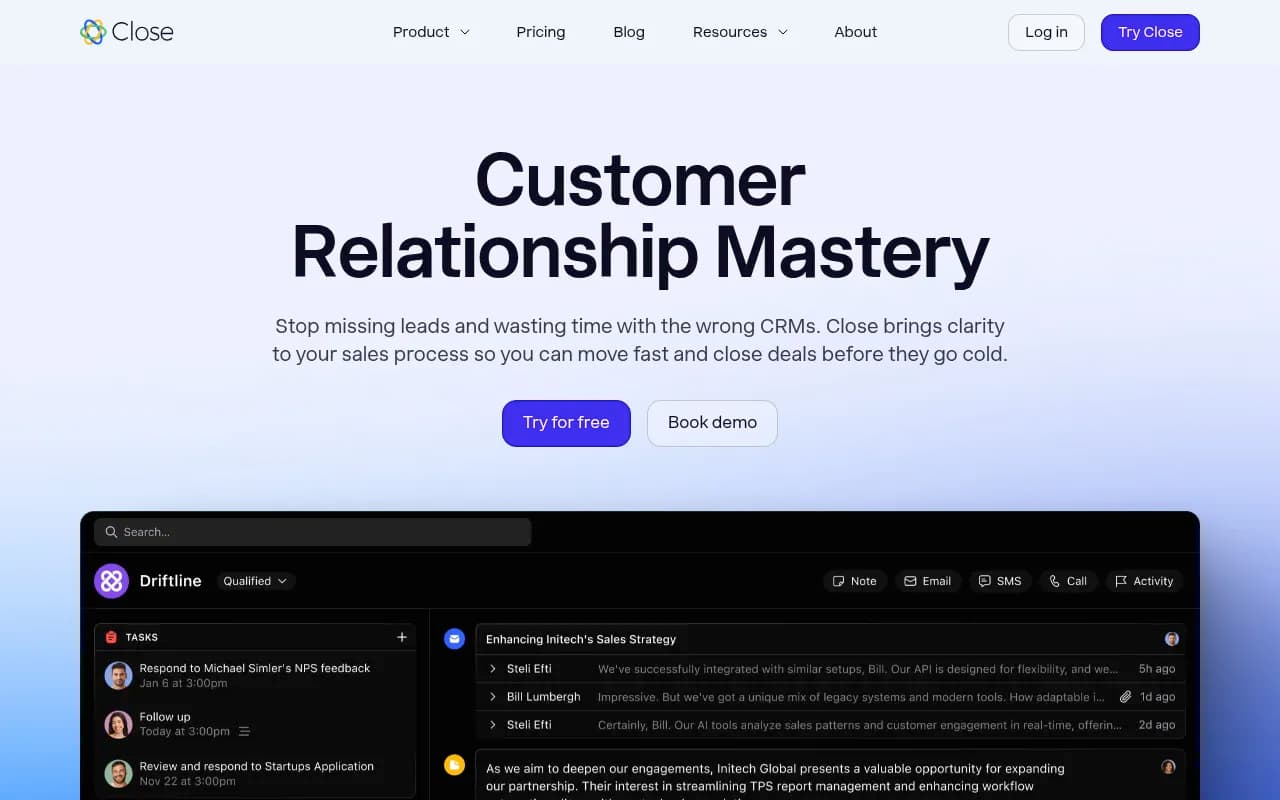
The core value proposition is simple: everything you need to communicate with leads lives inside Close. You can make calls using Close's built-in VoIP system (powered by Twilio), send emails through your connected inbox (Gmail, Outlook, or any IMAP/SMTP provider), and fire off SMS messages—all without leaving the CRM. Every interaction is automatically logged to the lead record, so your team always has full context. No more "Did anyone follow up with this person?" or "What did we talk about last time?" The activity feed shows the entire conversation history in one place.
The calling experience is particularly strong. Close includes a power dialer that lets you queue up a list of leads and blast through calls with one click. Call recording is built-in (with compliance controls for two-party consent states). The AI Notetaker transcribes every call in real-time and generates a summary with key points, action items, and next steps. You're not scrambling to take notes while talking—you're focused on the conversation, and Close handles the documentation. This is a huge time-saver for teams doing high-volume outbound.
Email templates and sequences are first-class features. You can create reusable templates with merge fields (first name, company, custom fields), schedule send times, and track opens/clicks. Email sequences (Close calls them "Smart Views") let you automate multi-touch follow-up campaigns—send an initial email, wait 3 days, send a follow-up, wait 2 days, make a call, etc. The sequences are flexible enough to handle most outbound workflows without needing a separate tool like Outreach or SalesLoft.
SMS is integrated but feels like a secondary feature. You can send texts from lead records, use templates, and log conversations, but there's no SMS sequences or bulk texting. It's useful for quick one-off messages ("Running 5 min late to our call") but not a replacement for dedicated SMS platforms if that's a core channel for you.
AI Features That Actually Save Time
Close has leaned into AI in ways that feel practical rather than gimmicky. The AI Notetaker is the standout—it joins your calls (both Close calls and external Zoom/Meet meetings via calendar integration) and produces transcripts plus structured summaries. The summaries pull out key details like budget, timeline, pain points, and objections, which get surfaced in the lead record. You can review the full transcript or just skim the highlights. This is especially valuable for managers who want to coach reps without listening to every call.
AI Enrich pulls in real-time data about leads from across the web—company size, industry, tech stack, recent news, social profiles—and populates custom fields automatically. You're not manually Googling every prospect or paying for a separate data enrichment tool like Clearbit. The data quality is solid for most B2B companies, though it's less reliable for very small businesses or non-US companies.
AI Summaries generate overviews of lead activity—recent emails, calls, status changes—so you can quickly get up to speed before a meeting. The Email Rewrite Assistant lets you draft an email, then click a button to make it more concise, more formal, more casual, or fix grammar. It's not revolutionary, but it's handy for reps who struggle with writing or need to adjust tone for different audiences.
One thing Close does well: the AI features are included in the platform, not sold as expensive add-ons. You're not paying an extra $50/user/month for AI like you would with some competitors.
Automation and Workflows
Close's automation is built around Workflows (if-this-then-that rules) and Smart Views (saved filters + sequences). Workflows let you trigger actions based on events—when a lead enters a certain status, assign it to a rep, send an email, create a task, update a field, etc. You can build multi-step workflows with delays and conditions. It's not as powerful as Zapier or a full marketing automation platform, but it covers the most common sales automation needs: lead routing, follow-up reminders, status updates, task creation.
Smart Views are Close's answer to sales cadences. You create a filtered list of leads (e.g. "All leads in 'Contacted' status with no activity in 3 days"), then attach a sequence of actions (send email, wait 2 days, create call task, wait 3 days, send another email). Reps work through their Smart Views each day, and Close tells them exactly what to do next. It's a lightweight alternative to dedicated sales engagement platforms, and it works well for teams that don't need the complexity of Outreach or Salesloft.
One limitation: Close's automation is focused on sales workflows, not marketing. You can't build drip campaigns for thousands of leads, score leads based on behavior, or run A/B tests on email copy. If you need marketing automation, you'll integrate Close with HubSpot, Mailchimp, or ActiveCampaign.
Pipeline and Deal Management
Close uses a traditional pipeline view with customizable stages (e.g. Prospecting > Qualified > Demo > Proposal > Closed Won). You can create multiple pipelines for different sales processes (new business vs. renewals, different product lines, etc.). Deals move through stages via drag-and-drop or automated workflows. Each deal has a value, expected close date, and probability, which feed into forecasting reports.
The pipeline view is clean and fast—no lag when dragging deals between stages, no clunky modals. You can filter by rep, date range, deal value, or custom fields. The Kanban-style board is the default view, but you can also switch to a list view or a calendar view (useful for seeing upcoming close dates).
Close supports custom fields (text, number, date, dropdown, multi-select, URL, etc.) so you can track whatever data matters to your sales process—industry, company size, lead source, competitor, pain points, etc. Custom fields can be used in filters, reports, and workflows. The field editor is straightforward, though it's not as flexible as Salesforce's object model (you can't create custom objects or complex relationships).
One nice touch: Close has a "Lead" and "Opportunity" model, but it's simplified compared to Salesforce. A Lead is a person or company you're selling to. An Opportunity is a specific deal. You can have multiple Opportunities per Lead (e.g. selling different products or tracking renewals). This two-tier model works well for most B2B sales processes without the complexity of Salesforce's Lead/Contact/Account/Opportunity hierarchy.
Reporting and Analytics
Close includes a set of pre-built reports: activity reports (calls, emails, SMS by rep), pipeline reports (deals by stage, win rate, average deal size), leaderboards (top performers by revenue, calls, emails), and forecasting (expected revenue by close date). The reports are visual (charts and graphs) and exportable to CSV. You can filter by date range, rep, team, or custom fields.
The reporting is solid for small teams that need to track basic metrics—who's making calls, what's in the pipeline, what's closing this month. It's not a replacement for a BI tool like Looker or Tableau. You can't build custom reports with complex formulas, and there's no SQL access to the underlying data. For advanced analytics, you'd export data to a spreadsheet or use Close's API to pull data into your own reporting system.
Close does offer a Zapier integration and a REST API, so you can push data to other tools (Google Sheets, Data Studio, your own database) if you need more flexibility. The API is well-documented and supports most CRUD operations on leads, opportunities, activities, and users.
Integrations and Ecosystem
Close integrates with 100+ tools via native integrations and Zapier. Key integrations include:
- Email: Gmail, Outlook, any IMAP/SMTP provider. Two-way sync so emails sent from Close show up in your inbox and vice versa.
- Calendar: Google Calendar, Outlook Calendar. Sync meetings, show availability, let leads book time via Close's scheduling links.
- Marketing: HubSpot, Mailchimp, ActiveCampaign. Sync leads and push data back and forth.
- Support: Intercom, Help Scout, Front. Connect support tickets to CRM records.
- Payments: Stripe. Track payment status and revenue in Close.
- Lead capture: Typeform, Gravity Forms, Webflow, Unbounce. Automatically create leads from form submissions.
- Enrichment: Clearbit (though Close's built-in AI Enrich reduces the need for this).
- Zapier: Connect to 3,000+ apps for custom workflows.
The integrations are generally reliable, though some users report occasional sync issues with Gmail (emails not showing up in Close, or duplicates). Close's support team is responsive about fixing these issues, but it's something to be aware of.
Close also offers embeddable web forms (lead capture forms you can add to your website) and a Slack integration (get notifications about new leads, closed deals, etc. in Slack channels).
One gap: Close doesn't have a native mobile app that's as full-featured as the web app. There is an iOS and Android app, but it's more limited—you can make calls, send emails, view leads, and update deal stages, but you can't build workflows or run reports. For teams that need full CRM access on mobile, this is a limitation.
Who Should Use Close
Close is built for small, high-velocity sales teams—typically 2-20 reps—that prioritize speed and simplicity over enterprise-grade customization. Specific personas:
- B2B SaaS founders and sales teams: Selling software with a 1-3 month sales cycle, doing outbound prospecting, need to track demos and trials. Close's speed and built-in calling are perfect for this.
- Agencies (marketing, design, dev): Selling services with a consultative sales process. Need to track proposals, follow up consistently, and manage multiple deals per client.
- Consultants and coaches: Solo or small teams selling high-ticket services. Need a simple CRM that doesn't require a full-time admin to manage.
- Real estate agents: Tracking leads, scheduling showings, following up with buyers and sellers. Close's SMS and calling features are particularly useful here.
- Recruiting firms: Managing candidate pipelines, tracking placements, coordinating interviews.
Close works best for teams that:
- Do a lot of outbound calling and emailing (10+ touches per lead)
- Have a relatively straightforward sales process (3-7 pipeline stages)
- Don't need complex marketing automation or lead scoring
- Want a CRM that reps will actually use (low learning curve, fast UI)
- Are willing to trade some customization for speed and simplicity
Close is NOT a good fit for:
- Enterprise sales teams with complex, multi-stakeholder deals that require extensive customization, custom objects, and advanced reporting. Salesforce is a better choice.
- Marketing-heavy organizations that need robust marketing automation, lead scoring, and campaign management. HubSpot is a better fit.
- Teams that need deep mobile functionality. Close's mobile app is functional but limited.
- Companies with very complex sales processes that require custom objects, multiple currencies, or territory management. Salesforce or Dynamics 365 would be better.
Pricing and Value
Close offers three main plans:
- Starter: $49/user/month (billed annually) or $59/month-to-month. Includes basic CRM, email, calling (500 minutes/user/month), SMS (100 messages/user/month), 1 pipeline, basic reporting. Good for solo sellers or very small teams.
- Professional: $99/user/month (annual) or $119/month-to-month. Adds unlimited calling and SMS, multiple pipelines, workflows, AI features (Notetaker, Enrich, Summaries), advanced reporting, Zapier integration. This is the sweet spot for most teams.
- Business: $149/user/month (annual) or $179/month-to-month. Adds dedicated account manager, custom onboarding, advanced permissions, API access, and priority support. For teams that need more hands-on support.
All plans include a 14-day free trial (no credit card required). There's also a "Startup" plan at $29/user/month for early-stage companies (must apply and meet criteria like <$1M revenue or <1 year old).
Compared to competitors:
- vs. HubSpot Sales Hub: HubSpot's free tier is more limited (no calling, no sequences), and the paid tiers start at $45/user/month but lack built-in calling (you pay extra for that). Close is better value if calling is core to your process.
- vs. Pipedrive: Pipedrive starts at $14/user/month but doesn't include calling or SMS (you pay extra for those). Close is more expensive but more all-in-one.
- vs. Salesforce: Salesforce starts at $25/user/month (Essentials) but is extremely limited. The real Salesforce experience starts at $75-150/user/month, and you'll pay extra for calling, advanced automation, and AI features. Close is much cheaper for small teams.
- vs. Copper: Copper starts at $29/user/month and is deeply integrated with Google Workspace, but it lacks built-in calling and has weaker automation. Close is better for outbound-heavy teams.
For a 5-person sales team, Close Professional would cost $495/month (annual billing). That's competitive with other sales-focused CRMs, especially considering you're getting calling, SMS, and AI features included.
Strengths
- Speed: Close is noticeably faster than HubSpot, Salesforce, and Pipedrive. Pages load instantly, searches are fast, and the UI doesn't lag. This matters when you're working 50+ leads a day.
- Built-in communication: Having calling, email, and SMS in one tool eliminates tab-switching and ensures everything is logged automatically. No more "Did I log that call?" or "Where did I put that email?"
- AI that's actually useful: The Notetaker, Enrich, and Summaries features save real time. You're not paying extra for AI or using a separate tool—it's just part of Close.
- Low learning curve: Reps can be productive in Close within an hour. The UI is intuitive, and there's not a lot of admin overhead. You're not spending weeks on implementation like you would with Salesforce.
- Great for outbound: The power dialer, email sequences, and Smart Views are purpose-built for high-volume outbound sales. If you're doing 50+ calls and 100+ emails a day, Close is built for you.
- Responsive support: Close's support team is known for being helpful and fast. You're not waiting days for a response or getting bounced between tiers of support.
Limitations
- No marketing automation: Close is a sales CRM, not a marketing platform. You can't build drip campaigns, score leads based on website behavior, or run A/B tests. If you need marketing automation, you'll integrate with HubSpot, Mailchimp, or ActiveCampaign.
- Limited customization: You can add custom fields and build workflows, but you can't create custom objects, complex relationships, or deeply customize the data model. Salesforce is far more flexible.
- Mobile app is basic: The iOS and Android apps let you make calls, send emails, and update deals, but you can't build workflows, run reports, or access all the features of the web app. If your team needs full CRM access on mobile, this is a gap.
- Reporting is basic: The pre-built reports cover the essentials, but you can't build custom reports with complex formulas or drill down into granular data. For advanced analytics, you'd export to a BI tool.
- Not built for enterprise: Close doesn't have territory management, multiple currencies, advanced permissions, or the level of customization that enterprise sales teams need. It's built for small, fast-moving teams, not 100-person sales orgs.
Bottom Line
Close is the CRM for small sales teams that want to spend more time selling and less time managing their CRM. If you're doing high-volume outbound (lots of calls, emails, follow-ups), need built-in communication tools, and want a platform that's fast and easy to use, Close is a strong choice. It's not trying to be everything to everyone—it's focused on helping small teams close deals quickly, and it does that exceptionally well.
Best use case in one sentence: B2B SaaS or agency sales teams (2-20 reps) doing outbound prospecting with a 1-3 month sales cycle who need speed, simplicity, and built-in calling/email.
Tags:
Similar and alternative tools to Close CRM