AgencyAnalytics Review 2026
AgencyAnalytics is an automated client reporting platform for marketing agencies. Connect 85+ integrations (SEO, PPC, social media) into white-labeled dashboards and scheduled reports. Used by 7,000+ agencies. 14-day free trial.
Key takeaways
- AgencyAnalytics is purpose-built for marketing agencies that need to report results to clients across SEO, PPC, social media, and other channels from a single platform.
- Connects 85+ data sources including Google Analytics, Google Search Console, Semrush, Ahrefs, Facebook Ads, Google Ads, Shopify, and more.
- White-label client portals and automated report scheduling make it easy to deliver polished, on-brand reporting without manual effort each month.
- Pricing starts around $59-$79/month depending on the plan, with a 14-day free trial and no credit card required.
- The platform is strong for traditional digital marketing reporting but has no capabilities for AI search visibility, GEO, or monitoring brand presence in LLMs -- a growing gap as AI search becomes a bigger part of the traffic picture.
AgencyAnalytics is a reporting and analytics platform built specifically for marketing agencies. The core idea is simple: agencies manage multiple clients across multiple channels, and stitching together data from Google Analytics, Facebook Ads, Google Search Console, and a dozen other platforms into a coherent monthly report is genuinely painful. AgencyAnalytics pulls all of that into one place, automates the report-building process, and lets agencies deliver professional, white-labeled reports to clients without spending hours in spreadsheets.
The company has been around since 2010, which makes it one of the older players in the agency reporting space. Over 7,000 marketing agencies use the platform, according to their own figures. That longevity shows in the product -- the integrations are mature, the templates are polished, and the workflow is clearly shaped by years of feedback from actual agency operators. It's not a flashy tool, but it does what it promises reliably.
The target audience is digital marketing agencies of almost any size -- from solo freelancers managing a handful of clients to mid-sized agencies with 50+ client accounts. The sweet spot is probably an agency with 10-50 clients that's outgrown manual reporting in Google Slides or Word docs but doesn't need the complexity of a full BI platform like Looker or Tableau.
Key features
Custom dashboards with drag-and-drop editing
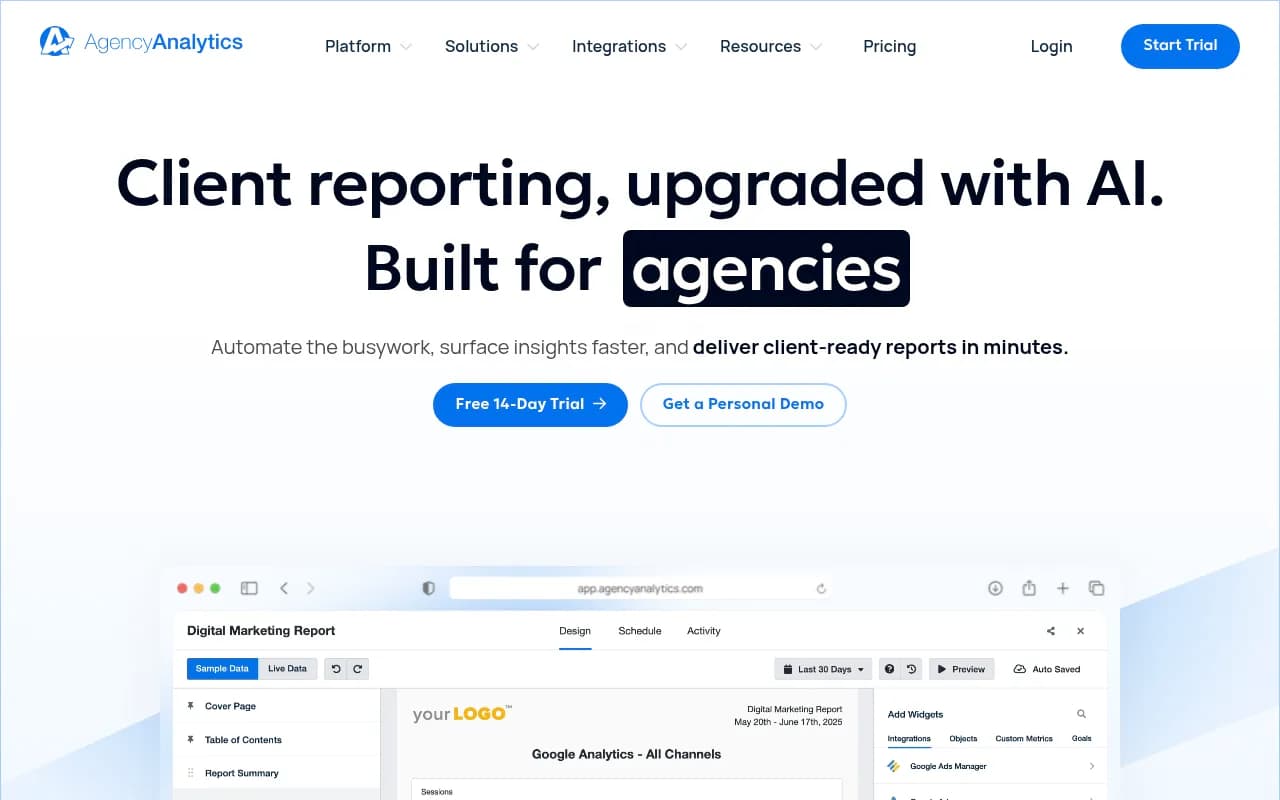
The dashboard builder is the heart of the product. You can pull in widgets from any connected integration and arrange them however you want. There are pre-built widget types for charts, tables, goal trackers, and text blocks. The customization is genuinely flexible -- you can create a dashboard that shows only the metrics a specific client cares about, hide everything else, and make it look like it was built in-house. Dashboards update automatically as new data comes in, so clients can log in at any time and see current numbers without you doing anything.
Automated report scheduling
This is probably the feature that saves agencies the most time. You build a report template once, connect it to a client's data sources, and set a schedule -- weekly, monthly, quarterly, whatever the client wants. AgencyAnalytics generates the report automatically and emails it to the client (or just makes it available in their portal). Reports can be exported as PDF or accessed online. The scheduling options are granular enough to handle most agency workflows, including custom date ranges and comparison periods.
White-label client portals
Each client gets their own branded portal with your agency's logo, colors, and domain. Clients log in and see their dashboards, reports, and tasks -- all under your brand. This is a meaningful feature for agencies that want to look like they've built a proprietary reporting system. The portal replaces the constant "how are things going?" check-in calls because clients can see their numbers whenever they want.
85+ integrations
The integration library covers most of what a digital marketing agency needs:
- SEO: Google Search Console, Semrush, Ahrefs, Moz
- Paid: Google Ads, Facebook Ads, Microsoft Ads, LinkedIn Ads, Amazon Ads
- Social: Facebook, Instagram, LinkedIn, X (Twitter), TikTok, YouTube
- Analytics: Google Analytics 4, Adobe Analytics
- E-commerce: Shopify, WooCommerce
- Email: Mailchimp, ActiveCampaign, Klaviyo
- Reviews: Google Business Profile, Birdeye
The breadth here is genuinely useful. Most agencies can connect everything they need without resorting to workarounds. Connecting an integration typically takes a few clicks through OAuth -- you're not writing API keys by hand.
SEO rank tracking
AgencyAnalytics includes a built-in rank tracker that monitors keyword positions in Google and Bing. You can track rankings by location (country, state, city), device type, and language. The rank tracker updates daily and shows historical trends, so you can show clients how their rankings have moved over time. It's not as deep as a dedicated rank tracker like Semrush or Ahrefs, but it's more than adequate for client reporting purposes and saves you from needing a separate subscription just for rank data.
Report templates
There's a library of pre-built report templates for common agency use cases: SEO reports, PPC reports, social media reports, Google Business Profile reports, and more. Templates are a real time-saver during client onboarding -- you connect the integrations, apply the template, and you have a professional report ready in minutes. Templates are fully customizable, so you can adjust them to match your agency's reporting style or a specific client's preferences.
Goal tracking and annotations
You can set goals for specific metrics (e.g., "reach 500 organic sessions per month") and track progress visually on dashboards and in reports. Annotations let you add context to charts -- useful for explaining why traffic dropped during a site migration or spiked after a campaign launch. These features help turn raw numbers into a narrative, which is what clients actually want from a report.
Staff and client user management
AgencyAnalytics has a multi-tier permission system. You can give team members access to specific client accounts, restrict what they can edit or view, and give clients their own login with limited access. This is important for agencies with multiple account managers -- you don't want a junior employee accidentally editing a client's dashboard or seeing accounts they shouldn't.
AI-assisted report summaries
More recently, AgencyAnalytics added AI-generated text summaries that can be inserted into reports. The AI reads the data and writes a plain-English summary of what happened -- traffic went up 12%, top-performing keyword was X, etc. It's a time-saver for the narrative sections of reports, though you'll want to review and edit the output before sending to clients.
Who is it for
The clearest fit is a digital marketing agency with 5-50 active clients that's currently spending significant time each month building reports manually. If your team is copying numbers from Google Analytics into a PowerPoint template, or if you're paying a junior employee to spend two days a month on reporting, AgencyAnalytics will pay for itself quickly. The platform is particularly well-suited to SEO agencies, PPC agencies, and full-service digital agencies that manage multiple channels per client.
Freelance digital marketers managing a small number of clients can use the Freelancer plan, though the value proposition is stronger as client count grows. The per-client pricing model means costs scale with your business, which is a reasonable structure for growing agencies.
Industries where it works especially well: local SEO agencies (the Google Business Profile integration and local rank tracking are solid), e-commerce agencies (Shopify and Amazon integrations), and social media agencies (broad social platform coverage). It's less useful for agencies focused on channels that aren't well-represented in the integration library -- PR agencies, for example, or agencies doing a lot of programmatic advertising on niche platforms.
Who should probably look elsewhere: very large agencies with complex data needs might find the reporting too templated and prefer a proper BI tool. Agencies that need deep custom data modeling, multi-touch attribution across offline and online channels, or highly complex segmentation will hit the platform's limits. And agencies that want to track or report on their clients' AI search visibility -- how they appear in ChatGPT, Perplexity, or Google AI Overviews -- won't find that here. AgencyAnalytics is built around traditional digital marketing channels and doesn't touch AI search at all.
Integrations and ecosystem
The 85+ integrations are the backbone of the platform. Most connect via OAuth, which means setup is fast and you don't need developer involvement. The integrations are organized into categories on their website, and the list is updated regularly as new platforms become relevant.
There's a public API that lets developers pull data out of AgencyAnalytics for custom workflows or to push data into other systems. The API documentation is available in their help center. It's not the most developer-friendly API in the market, but it covers the basics.
AgencyAnalytics doesn't have a native Zapier integration listed prominently, but the API enables custom automation for teams with developer resources. There's no native Looker Studio connector, which is a minor gap for agencies that want to blend AgencyAnalytics data with other sources in a custom BI environment.
The platform is web-based with no dedicated mobile app, though the web interface is responsive. There's no browser extension. White-label options include custom domain support for client portals, which is a meaningful feature for agencies that want the portal to appear as their own product.
Pricing and value
AgencyAnalytics uses a per-client pricing model with three main tiers:
- Freelancer: Around $59/month (billed annually) for up to 5 clients. Covers core reporting features, dashboards, and integrations.
- Agency: Around $179/month (billed annually) for up to 10 clients, with additional clients available at a per-client add-on rate. Includes more advanced features like custom domains and additional staff seats.
- Agency Pro: Higher tier with additional features including more AI capabilities, priority support, and higher limits.
Note that pricing has been updated in 2026 and the exact numbers vary depending on billing cycle (monthly vs. annual) and client count. The website advertises starting at $59/month, but real-world costs for a typical agency with 20+ clients will be meaningfully higher. It's worth using their pricing calculator to get an accurate number for your specific situation.
The 14-day free trial requires no credit card, which is a low-friction way to test the platform. Compared to alternatives like DashThis (starts around $49/month but with data source limits), Whatagraph (higher price point, more enterprise-focused), or Databox (more BI-oriented), AgencyAnalytics sits in a reasonable middle ground for agency-specific use cases.
For an agency billing $3,000-$5,000/month per client, the cost of AgencyAnalytics is trivial relative to the time saved on reporting. The value calculation is straightforward.
Strengths and limitations
What it does well:
- The integration breadth is genuinely impressive. 85+ connections covering the full digital marketing stack means most agencies can consolidate their reporting without gaps.
- White-label client portals are polished and professional. Clients get a good experience, and the agency looks like they've invested in proprietary technology.
- Report automation is reliable. Once set up, reports go out on schedule without manual intervention -- which is the whole point.
- The template library speeds up client onboarding significantly. You're not starting from scratch for every new client.
- Rank tracking is included at no extra cost, which removes the need for a separate SEO tool subscription just for client-facing rank data.
Honest limitations:
- The platform has no coverage of AI search channels. As ChatGPT, Perplexity, and Google AI Overviews become meaningful traffic sources, agencies will increasingly need to report on AI visibility alongside traditional SEO metrics. AgencyAnalytics doesn't touch this at all. Agencies that want to show clients how they appear in AI search results will need a separate tool for that.
- Deep customization has limits. The drag-and-drop builder is flexible, but agencies with very specific data visualization needs or complex multi-source blending will find the platform constraining compared to a proper BI tool.
- The API is functional but not particularly developer-friendly. Agencies that want to build custom integrations or automate complex workflows will find it less capable than more developer-oriented platforms.
Bottom line
AgencyAnalytics is a solid, mature platform for marketing agencies that need to automate client reporting across traditional digital marketing channels. It's not trying to be a BI tool or an analytics platform -- it's specifically designed to make agency reporting faster, more professional, and less manual. For that specific job, it does it well.
The best use case in one sentence: a digital marketing agency with 10-50 clients that wants to stop spending 20+ hours a month building reports and start delivering polished, automated reporting that clients can access 24/7 through a branded portal.
One gap worth noting: as AI search becomes a real traffic source, agencies will need to report on AI visibility alongside traditional SEO. AgencyAnalytics doesn't cover that territory. For agencies that want to track and report on how clients appear in ChatGPT, Perplexity, or Google AI Overviews, a dedicated platform like Promptwatch handles that side of the picture.
Frequently asked questions
What is AgencyAnalytics?
How much does AgencyAnalytics cost?
Who is AgencyAnalytics best for?
What integrations does AgencyAnalytics support?
Does AgencyAnalytics support white-label reporting?
Does AgencyAnalytics track AI search visibility?
Similar and alternative tools to AgencyAnalytics