PageCrawl.io Review 2026
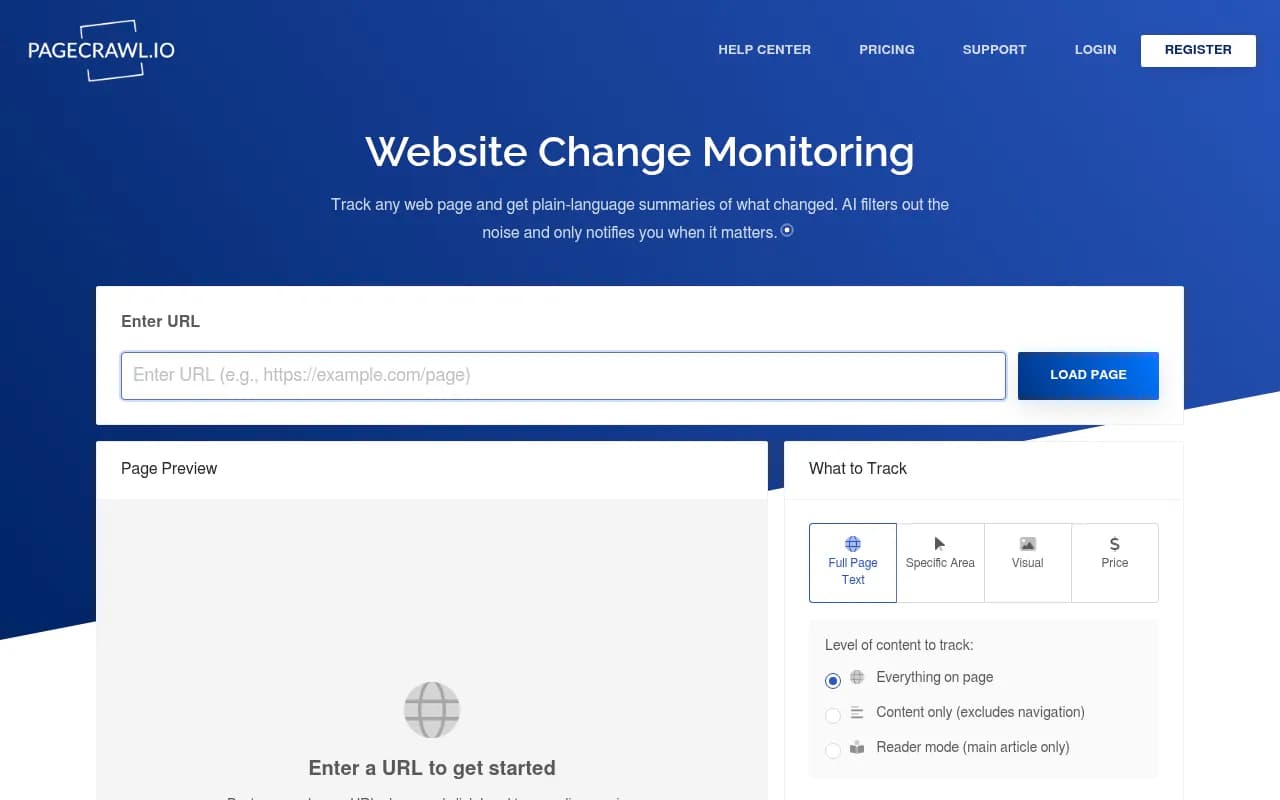
PageCrawl.io monitors any web page for changes and uses AI to summarize what changed, filter noise by importance score, and alert you only when it matters. Trusted by thousands since 2018 for competitor tracking, compliance, and price monitoring.
Key takeaways
- PageCrawl.io has been tracking website changes since 2018 -- it's one of the more mature tools in this space, with a 4.9/5 rating on G2 from verified users
- The AI layer is genuinely useful: plain-language summaries, a 0-100 importance score, and pattern learning that gets smarter as you dismiss irrelevant changes
- Free plan covers 6 pages with checks every 60 minutes -- enough to evaluate the tool, not enough for real work
- Paid plans start at $6.67/month (billed annually) for up to 100 pages, scaling to enterprise-level monitoring for tens of thousands of pages
- Solid integration coverage: Slack, Teams, Discord, Telegram, Zapier, n8n, Google Sheets, RSS, webhooks, and an MCP server for AI assistants
- Missing: this is a website monitoring tool, not an AI search visibility platform -- if you need to track how your brand appears in ChatGPT or Perplexity, Promptwatch is built for that
PageCrawl.io is a website change monitoring service that has been running since 2018. The core idea is simple: you give it a URL, it checks that page on a schedule, and it tells you when something changes. What makes it more interesting than the basic "diff checker" tools that have existed for decades is the AI layer sitting on top of the detection engine. Instead of just flagging that pixels or HTML changed, it generates a plain-language summary of what actually happened and scores the change by importance so you can ignore the noise.
The target audience is broad by design. Compliance teams use it to archive regulatory pages and prove they were monitoring for changes. Competitive intelligence teams point it at competitor pricing pages, product listings, and job boards. Procurement teams track supplier pricing. Content teams monitor news sources and industry publications. The tool doesn't try to be a specialist in any one of these -- it's a general-purpose monitoring platform that happens to have enough configuration depth to serve all of them reasonably well.
The company behind it doesn't make a big deal of its origins, but the "trusted by thousands since 2018" positioning is consistent across the site. That's a meaningful tenure in a space where many tools have come and gone. The G2 rating of 4.9 out of 5 from verified reviews suggests the customer base is genuinely happy, and the testimonials specifically call out responsive customer support -- which matters a lot for a tool where setup complexity can vary wildly depending on what you're trying to monitor.
Key features
AI summaries and noise filtering
This is the headline feature and it works as advertised. Every detected change gets a 1-3 sentence plain-language summary explaining what actually changed. More useful is the importance score: a 0-100 rating that lets you set a threshold below which you simply don't get notified. If a footer copyright year updates or a cookie banner shifts, that scores low and gets filtered. If a competitor changes their pricing page headline, that scores high and you hear about it immediately.
The pattern learning component adds a feedback loop. When you dismiss a change as irrelevant, the AI notes the pattern and starts filtering similar changes automatically. Over time, the system gets calibrated to your specific monitoring context -- which is a meaningful improvement over tools that require you to manually configure CSS selectors to exclude dynamic content.
Custom instructions
You can provide context at the workspace or individual page level to help the AI generate more relevant summaries. For example, telling the system "this is a competitor's pricing page, focus on plan names, prices, and feature changes" produces more targeted summaries than the default. This is a small but practical feature that separates PageCrawl from simpler monitoring tools.
Real browser rendering
PageCrawl uses a fully JavaScript-enabled browser for its checks, not a simple HTTP request. This matters because a large percentage of modern web pages render content dynamically via JavaScript -- a basic HTTP scraper would miss most of it. The real browser approach means you can monitor single-page applications, dynamically loaded pricing tables, and content that only appears after user interaction.
Perform actions
This goes beyond passive monitoring. You can configure the tool to interact with a page before capturing it: click buttons, type text, submit forms, wait for specific text to appear, or block cookie banners. This is how you monitor pages that require interaction to reveal the content you care about -- a product configurator, a search results page, or a form-gated pricing calculator.
Password-protected page monitoring
You configure a login sequence once and apply it to multiple monitored pages. This is useful for monitoring internal tools, client portals, or any content that sits behind authentication. The configuration is reusable, so you don't have to re-enter credentials for every page on the same domain.
Auto-discover pages
Rather than manually adding URLs one by one, you can point PageCrawl at a website and have it automatically find and start monitoring new pages as they're published. You set up a template that defines how new pages should be monitored, and the system applies it automatically when new pages appear. This is particularly useful for monitoring competitor blogs, product catalogs, or news sites where new content appears regularly.
File tracking
PageCrawl monitors more than web pages. It tracks changes in public PDF, Excel, Word, and PowerPoint files, as well as documents on Google Drive and Microsoft SharePoint. For compliance teams tracking regulatory documents or procurement teams monitoring supplier spec sheets, this is a genuinely useful extension of the core monitoring capability.
Review board
For compliance use cases where you need to document that you reviewed every change, the Review Board provides a Kanban-style interface for flagging and annotating detected changes. You can add notes, mark changes as reviewed, and maintain an audit trail. This is a feature that basic monitoring tools don't offer and that compliance teams specifically need.
Bulk management and templates
You can paste multiple URLs at once, scan an entire website to find pages matching a pattern, and apply configuration changes to multiple pages simultaneously. Reusable templates mean you can define monitoring settings once and apply them to any new page. For anyone managing more than a handful of monitored pages, this is the difference between a manageable workflow and a maintenance nightmare.
MCP server integration
PageCrawl has an MCP (Model Context Protocol) server that lets you connect it to AI assistants like Claude and ChatGPT. You can manage monitors and check change history through natural language conversation. This is a relatively new capability that reflects where the broader AI tooling ecosystem is heading -- and it's a practical addition for teams already using AI assistants in their workflows.
Who is it for
The clearest fit is competitive intelligence teams at mid-size companies who need to track 50-500 pages across a handful of competitors. Think a SaaS company monitoring competitor pricing pages, feature announcement blogs, and job postings to understand where the competition is investing. The AI summaries mean the analyst doesn't have to manually review every change -- they get a digest of what actually matters.
Compliance and legal teams are another strong fit, particularly in regulated industries like financial services, healthcare, or pharmaceuticals where you need to demonstrate that you were monitoring specific web pages for changes. The Review Board feature and screenshot archiving give you the audit trail you need. The time-travel feature -- being able to see how a page looked at any point in the past -- is directly useful for legal discovery or regulatory review.
Procurement and pricing teams at e-commerce businesses or retailers tracking supplier and competitor pricing represent a third clear use case. The price monitoring use case is explicitly called out on the site, and the ability to monitor specific page elements (rather than the whole page) means you can isolate the price field and ignore everything else.
Who shouldn't use this: if you're a solo developer who just wants to know when a single page changes, the free tier covers you but there are simpler free tools available. If you need to monitor thousands of pages with sub-minute frequency, the pricing scales up quickly and you'd want to evaluate whether a custom scraping solution makes more sense. And if your goal is to track how your brand or content appears in AI search results -- ChatGPT, Perplexity, Google AI Overviews -- PageCrawl doesn't do that at all. That's a different problem requiring a different tool.
Integrations and ecosystem
PageCrawl's integration coverage is genuinely broad for a tool at this price point:
- Messaging and collaboration: Slack, Microsoft Teams, Discord, Telegram -- all with native integrations that send change alerts directly to channels
- Automation platforms: Zapier (2,000+ connected apps) and n8n for workflow automation and agentic AI workflows
- Data and storage: Google Sheets sync for ongoing data analysis, Dropbox for automatic screenshot saves
- Developer tools: REST API and real-time webhooks for custom integrations
- Content consumption: RSS feeds for change updates in any feed reader
- Enterprise auth: SAML SSO for secure team authentication
- AI assistants: MCP server for Claude and ChatGPT integration
- AI flexibility: Bring Your Own API Key (BYOK) support so you can use your own OpenAI or other AI API key instead of consuming PageCrawl's built-in credits
The BYOK option is worth noting specifically -- for high-volume users who are burning through AI credits on large monitoring setups, being able to route AI analysis through your own API key gives you cost control that most competitors don't offer.
There's no dedicated mobile app mentioned, but the Telegram integration effectively provides mobile push notifications. The browser extension situation isn't explicitly addressed on the main site.
Pricing and value
PageCrawl offers four tiers:
- Free: $0/month, up to 6 pages, checks every 60 minutes, up to 220 checks/month
- Standard: $6.67/month (billed annually at $80/year), up to 100 pages, checks every 15 minutes, up to 15,000 checks/month
- Enterprise: $25/month (billed annually at $300/year) starting at 500 pages, checks every 5 minutes, up to 100,000 checks/month. Scales up to 50,000 pages
- Ultimate: $82.50/month (billed annually at $990/year) starting at 1,000 pages, checks every 2 minutes, up to 100,000 checks/month. Scales up to 100,000 pages
All plans include AI credits. The Enterprise plan adds unlimited screenshot storage. Annual billing saves the equivalent of two months compared to monthly pricing.
The Standard plan at $6.67/month is genuinely cheap for what it does -- 100 pages with 15-minute check frequency covers most small business use cases. The jump to Enterprise at $25/month for 500 pages is also reasonable for teams. Where it gets expensive is at the high end of the Enterprise tier when you're scaling to tens of thousands of pages -- the pricing slider on the site goes up to 50,000 pages on Enterprise, and those numbers aren't published transparently.
Compared to alternatives like Visualping or Distill.io, PageCrawl is competitively priced and offers more AI functionality at similar price points. The free tier is more limited than some competitors (Distill.io's free tier is more generous), but the paid tiers offer better value for teams.
Strengths and limitations
What it does well:
- The AI noise filtering is the standout feature. The combination of importance scoring, pattern learning, and custom instructions means you can actually trust the alerts you receive -- which is the core problem with most monitoring tools
- Setup flexibility is impressive. CSS/XPath selectors, element-level tracking, action sequences, proxy rotation, RegEx patterns, device size simulation, custom headers -- the configuration depth is there when you need it
- Customer support quality comes up repeatedly in reviews, and the testimonial about getting an email saying "what you needed is now a feature" suggests a team that actually listens to users
- The file tracking capability (PDFs, Office docs, Google Drive, SharePoint) is a meaningful differentiator that many competitors lack
- The MCP server integration is forward-thinking and useful for teams already building AI-assisted workflows
Limitations:
- The free tier is quite limited at 6 pages -- enough to test the tool but not to evaluate it properly for a real use case. A 14-day trial of a paid tier would be more useful for evaluation
- Cloudflare and CAPTCHA bypass is available but the CAPTCHA bypass comes at additional cost, which adds unpredictability to pricing for users monitoring heavily protected sites
- There's no native mobile app, which matters if you need to review changes on the go rather than just receive notifications
- For very large-scale monitoring (tens of thousands of pages), the pricing isn't transparently published and you'd need to contact sales -- which adds friction for self-serve buyers
Bottom line
PageCrawl.io is a well-built, mature website change monitoring tool that earns its 4.9/5 G2 rating. The AI layer -- summaries, importance scoring, pattern learning -- genuinely improves on the basic "something changed" notification model that older tools offer. It's a strong choice for competitive intelligence teams, compliance departments, and pricing analysts who need reliable, configurable monitoring with smart alerting.
Best use case in one sentence: a competitive intelligence analyst at a mid-size SaaS company who needs to monitor 50-200 competitor and industry pages and wants AI-summarized alerts delivered to Slack without drowning in noise.
Tags:
Frequently asked questions
What is PageCrawl.io?
How much does PageCrawl.io cost?
Is there a free plan?
What integrations does PageCrawl.io support?
Can PageCrawl.io monitor pages behind a login?
What types of content can PageCrawl.io monitor?
Similar and alternative tools to PageCrawl.io