Hemingway App Review 2026
Make content easier to read by highlighting complex sentences and passive voice. Helps writers create accessible, engaging content for all audiences.
Summary
- Best for: Bloggers, content marketers, and writers who want to simplify their prose and improve readability without AI rewrites
- Standout strength: Real-time visual feedback on sentence complexity and readability grade level -- you see exactly which sentences are too dense
- Key limitation: The free web version lacks grammar checking and AI tools; those require Hemingway Editor Plus ($10/mo or $100/yr)
- Missing vs competitors: No plagiarism detection, no SEO optimization, no team collaboration features that tools like Grammarly Business offer
- Competes with Promptwatch? No -- this is a writing clarity tool, not an AI search visibility platform
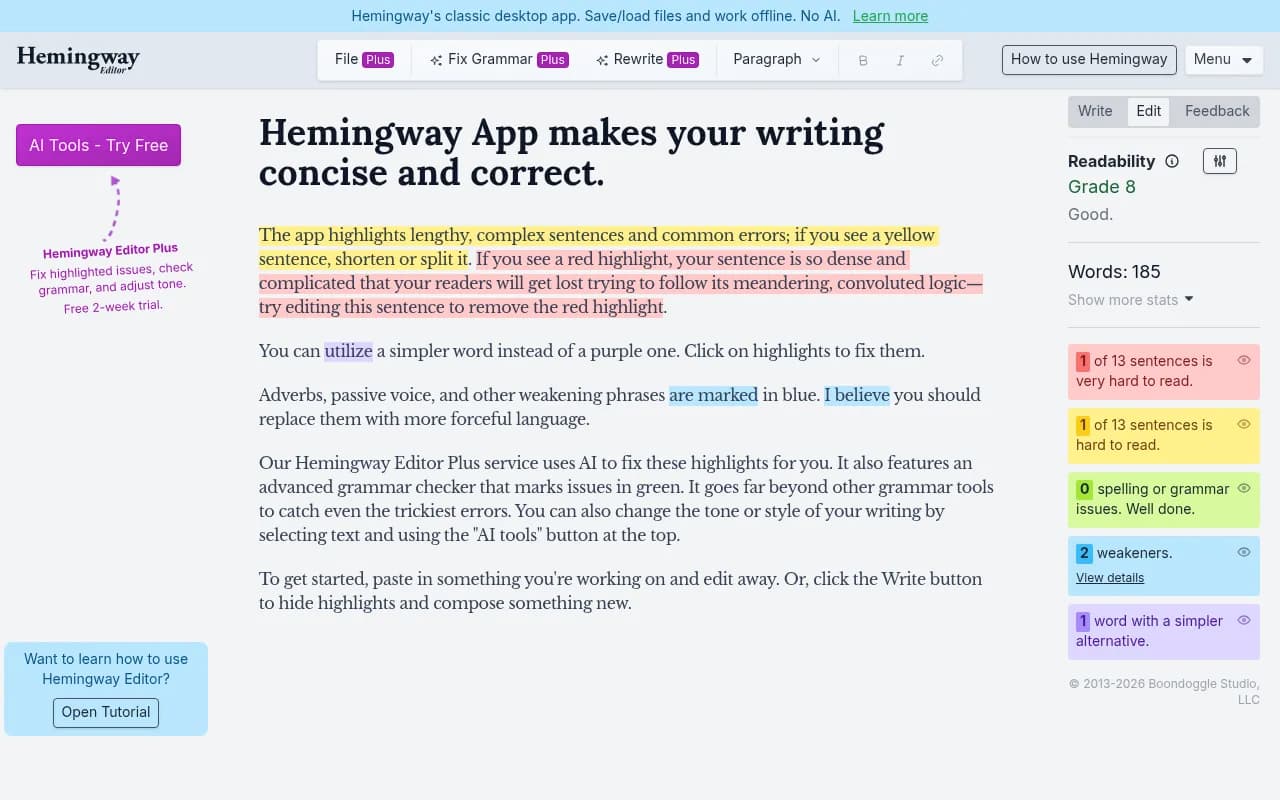
Hemingway App is a writing editor built around a single, powerful idea: if a sentence is hard to read, it should be hard to miss. The tool uses color-coded highlights to flag readability issues in real time -- yellow for complex sentences, red for very dense ones, purple for simpler word alternatives, and blue for passive voice and adverbs. The result is a brutally honest assessment of your prose that forces you to confront every unnecessary clause and weak verb.
The app is named after Ernest Hemingway, whose writing style was famously direct and economical. The tool aims to push writers toward that same clarity. It was created by brothers Adam and Ben Long and launched in 2013 as a free web app. It quickly gained traction among bloggers and content marketers who wanted a simpler alternative to heavyweight grammar checkers. The desktop version launched in 2014 for a one-time $19.99 purchase. In recent years, the team added Hemingway Editor Plus, a subscription service that layers AI-powered grammar checking and rewriting on top of the original readability analysis.
Readability Scoring and Highlighting
The core feature is the readability grade level, displayed prominently at the top of the editor. It tells you what grade level a reader would need to understand your text -- e.g. "Grade 8" means an eighth-grader could follow it. The algorithm is based on the Automated Readability Index, which factors in sentence length and word complexity. Most professional writing aims for grade 8-10 to reach the widest audience. Academic or technical writing might land at grade 12-14. Anything above grade 15 is a signal that you're losing general readers.
The color-coded highlights work like this:
- Yellow sentences are hard to read. They're usually long or structurally complex. The fix is to split them into two sentences or cut unnecessary words.
- Red sentences are very hard to read. These are the ones that make readers backtrack to figure out what you meant. If you see red, that sentence needs surgery.
- Purple words are complex words with simpler alternatives. Hemingway suggests you replace "utilize" with "use" or "commence" with "start." The suggestions appear when you click the highlight.
- Blue highlights mark adverbs (words ending in -ly) and passive voice constructions. The tool considers these "weakening" because they dilute the impact of your verbs. "He quickly ran" is weaker than "He sprinted." "The report was written by the team" is passive; "The team wrote the report" is active and clearer.
The app also counts sentences, words, characters, paragraphs, and reading time. It's a lightweight stats panel that gives you a sense of document length at a glance.
Write Mode vs Edit Mode
Hemingway has two modes. Edit mode shows all the highlights and is where you do your revision work. Write mode hides the highlights so you can draft without distraction. The idea is to separate creation from editing -- get your ideas down first, then tighten them up. This is a small but thoughtful design choice that keeps the tool from becoming a nagging presence while you're trying to think.
Hemingway Editor Plus (AI Features)
The free version is just the readability analysis. Hemingway Editor Plus adds three major features:
- Grammar checking: Green highlights mark grammar errors like subject-verb disagreement, incorrect punctuation, and misused words. The team claims it catches errors that other tools miss, though in practice it's comparable to Grammarly's free tier. It's not as comprehensive as Grammarly Premium or ProWritingAid.
- AI rewrites: Select any text and click "Rewrite" to get an AI-generated alternative that's clearer or more concise. You can also change the tone (formal, casual, confident, friendly) or adjust the style. This is powered by a language model (likely GPT-based, though the team doesn't specify). The rewrites are decent but not magical -- they tend to simplify sentence structure and swap out complex words, which is exactly what the free version already tells you to do manually.
- Fix Grammar button: A one-click option to auto-fix all grammar issues in the document. It works well for obvious errors but can introduce awkward phrasing if you're not careful. You still need to review the changes.
Pricing for Plus is $10/month or $100/year (effectively $8.33/month). There's a free trial to test the AI features. Team plans are available for agencies or companies that want to manage multiple licenses under one admin account.
Desktop App
The desktop version is a one-time purchase of $19.99 for Mac or Windows. It's essentially the free web app packaged as a standalone application. The advantage is offline access and the ability to save/load files locally. The desktop app does NOT include the AI features from Hemingway Editor Plus -- those are web-only and require a subscription. If you want AI rewrites and grammar checking, you need to use the web version with a Plus subscription.
The desktop app is a good fit for writers who work offline frequently (on planes, in cafes without Wi-Fi) or who prefer a native application over a browser tab. The $19.99 price is a one-time payment with no recurring fees, which makes it a solid deal if you just want the readability analysis.
Who Is It For
Hemingway is best for writers who produce content for general audiences and want to keep their prose accessible. Specific use cases:
- Bloggers and content marketers who write for readers with varying education levels. If you're publishing on Medium, Substack, or a company blog, Hemingway helps you avoid the dense, jargon-heavy sentences that make readers bounce.
- Copywriters who need punchy, direct language for landing pages, ads, or email campaigns. The tool's bias toward short sentences and active voice aligns with conversion-focused writing.
- Non-native English speakers who want to simplify their writing and avoid overly complex constructions. The visual feedback is easier to parse than a list of grammar rules.
- Students and academics who are writing for a general audience (op-eds, blog posts, public-facing research summaries) rather than peer-reviewed journals. If you're used to writing at a graduate level, Hemingway will force you to dial it back.
Hemingway is NOT ideal for:
- Technical writers or academics who need to maintain a formal tone and precise terminology. The tool will flag technical language as "complex" even when it's necessary. You'll spend more time dismissing false positives than improving your writing.
- Fiction writers who use long, flowing sentences for stylistic effect. Hemingway's algorithm doesn't account for intentional complexity or rhythm. If you're writing literary fiction, the tool will butcher your voice.
- Teams that need collaboration features. There's no real-time co-editing, no comments, no version history. It's a solo tool.
Integrations and Ecosystem
Hemingway is a standalone tool with no integrations. There's no API, no browser extension, no mobile app, no Zapier connection. You copy-paste text into the editor, revise it, then copy-paste it back into your CMS or word processor. This is both a strength and a limitation -- the tool is simple and focused, but it doesn't fit into a modern content workflow the way Grammarly (browser extension, Google Docs add-on, API) or ProWritingAid (integrates with Scrivener, Word, Google Docs) do.
The desktop app can import and export plain text, Markdown, Word documents, and HTML. That's the extent of the file format support.
Strengths
- Visual clarity: The color-coded highlights make it immediately obvious where your writing is weak. You don't need to read through a list of suggestions -- the problem sentences jump out.
- Readability focus: Most grammar checkers prioritize correctness over clarity. Hemingway does the opposite. It assumes your grammar is fine and focuses on whether a general reader can follow your argument.
- No subscription required for core features: The free web version and the $19.99 desktop app give you the readability analysis with no recurring fees. That's rare in 2026.
- Fast and lightweight: The app loads instantly and handles long documents (10,000+ words) without lag. It's not trying to be an all-in-one writing suite.
Limitations
- No plagiarism detection: If you're a student or a content marketer who needs to verify originality, you'll need a separate tool like Copyscape or Grammarly's plagiarism checker.
- Grammar checking is paywalled: The free version doesn't catch grammar errors at all. You need Hemingway Editor Plus ($10/mo) for that, and even then it's not as thorough as Grammarly Premium or ProWritingAid.
- AI rewrites are generic: The Plus subscription includes AI-powered rewrites, but they're not impressive. The suggestions tend to simplify sentences in predictable ways. You could do the same thing manually by following the free version's highlights.
- No team features: There's no way to share documents, leave comments, or track changes. If you're working with an editor or a content team, you'll need Google Docs or Microsoft Word.
- False positives on technical content: The tool flags technical terms and long sentences even when they're necessary. If you're writing a software tutorial or a medical explainer, you'll spend a lot of time ignoring the highlights.
Pricing and Value
The free web version is genuinely useful and has no word limit or usage cap. You can use it indefinitely without paying. The $19.99 desktop app is a one-time purchase that adds offline access and file management. Hemingway Editor Plus is $10/month or $100/year and adds AI rewrites and grammar checking.
Compared to competitors:
- Grammarly Free offers grammar checking but no readability analysis. Grammarly Premium is $12/month (annual billing) and includes advanced grammar, tone detection, and plagiarism checking. Hemingway Plus is cheaper but less comprehensive.
- ProWritingAid is $10/month or $120/year and includes grammar, style, readability, and integrations with Word, Scrivener, and Google Docs. It's more feature-rich than Hemingway Plus.
- Readable.com is a readability-focused tool like Hemingway but with more detailed metrics (Flesch-Kincaid, SMOG index, etc.). It's $4/month for basic features or $48/year. Hemingway's free version is more user-friendly.
The value proposition depends on what you need. If you just want readability analysis, the free version is hard to beat. If you need grammar checking and AI rewrites, Grammarly or ProWritingAid offer better value for the same price.
Bottom Line
Hemingway App is the best free tool for writers who want to simplify their prose and improve readability. The color-coded highlights make it easy to spot problem sentences, and the readability grade level gives you a clear target to aim for. It's fast, focused, and doesn't try to do too much.
The free version is the sweet spot. The desktop app is worth $19.99 if you work offline frequently. Hemingway Editor Plus is harder to recommend -- the AI features are underwhelming, and the grammar checking doesn't justify the $10/month cost when Grammarly and ProWritingAid offer more for the same price.
Best use case in one sentence: Use the free web version to tighten up blog posts, marketing copy, or any content aimed at a general audience.
Similar and alternative tools to Hemingway App