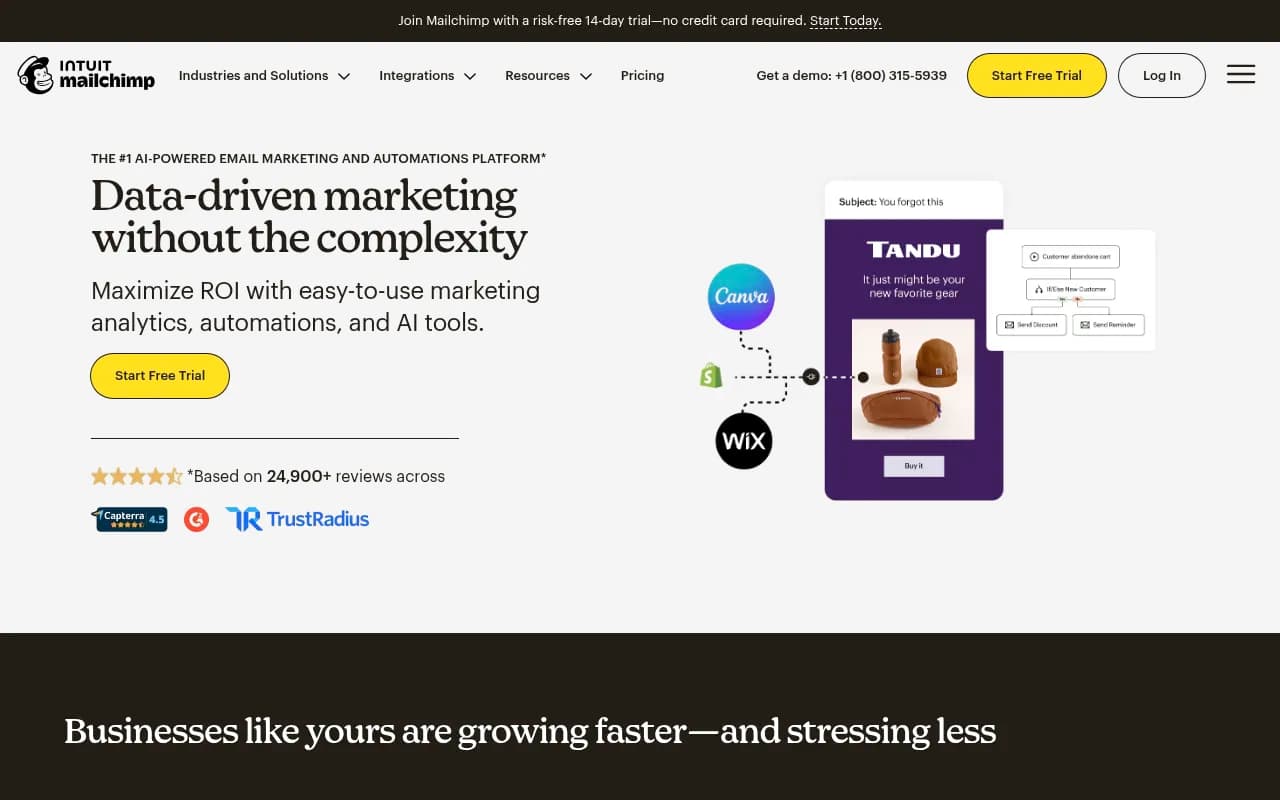
Mailchimp CRM Review 2026
CRM platform integrated with email marketing capabilities, offering automation tools for customer engagement and sales workflows.
Key Takeaways
- Mailchimp is the market-leading email marketing platform with 24+ years of history and millions of users, offering a complete suite of marketing automation tools
- Strong e-commerce focus with deep Shopify, WooCommerce, and Square integrations -- users report up to 30x ROI on Standard plans
- AI-powered content generation and optimization tools built directly into the platform (9.8+ billion AI-generated emails sent)
- Pricing starts free for up to 500 contacts, then $20/month for Standard plan with 14-day free trial
- Best for small to mid-sized businesses and e-commerce stores; enterprise users may find limitations in advanced segmentation and customization
Mailchimp started in 2001 as a side project by Ben Chestnut and Dan Kurzius, two web designers who needed a better way to send email newsletters for their clients. Over two decades, it grew into the dominant player in email marketing -- acquired by Intuit in 2021 for $12 billion. Today, Mailchimp serves millions of businesses across 175 countries, from solo entrepreneurs to brands like Spotify, Gap Inc, and Subway. The platform has evolved far beyond basic email blasts into a full marketing automation suite with AI tools, SMS campaigns, landing pages, and deep e-commerce integrations.
The target audience is primarily small to mid-sized businesses (1-200 employees) who need an affordable, easy-to-use marketing platform without hiring a dedicated marketing ops team. E-commerce sellers on Shopify, WooCommerce, BigCommerce, and Square are a sweet spot -- Mailchimp's product recommendations, abandoned cart automations, and purchase-based segmentation are built specifically for online stores. Freelancers, agencies, nonprofits, and local businesses (restaurants, gyms, real estate) also make up a significant user base. If you're a Fortune 500 company with complex multi-brand requirements and a dedicated MarTech stack, Mailchimp probably isn't the right fit -- you'd be better served by Salesforce Marketing Cloud or Adobe Campaign.
Email Campaign Builder Mailchimp's drag-and-drop email editor is one of the most intuitive in the industry. You start with a template (hundreds available, organized by industry and use case) or build from scratch using content blocks -- text, images, buttons, dividers, social links, product recommendations, coupon codes. The interface is clean and responsive. You can preview how emails render across devices (desktop, mobile, dark mode) before sending. Custom HTML editing is available for developers who want full control. The AI writing assistant (called Intuit Assist) can generate subject lines, body copy, and CTAs based on your campaign goal and brand voice -- it's trained on billions of Mailchimp campaigns and actually produces usable content, not generic filler. One limitation: the template library, while extensive, can feel dated compared to newer tools like Beefree or Stripo. Power users often build templates in external editors and import them.
Marketing Automation This is where Mailchimp separates itself from basic email senders. Pre-built automation workflows include welcome series, abandoned cart recovery, post-purchase follow-ups, birthday emails, re-engagement campaigns, and product recommendations. Each workflow is customizable with conditional logic (if/then branches based on opens, clicks, purchases, tags, or custom fields). You can add time delays, A/B test different paths, and trigger actions across channels (email + SMS). The Customer Journey Builder visualizes the entire flow and shows real-time performance metrics at each step. E-commerce automations are particularly strong -- Mailchimp pulls product data directly from your store and can send personalized recommendations based on browsing history, past purchases, or cart contents. The main weakness: compared to dedicated automation platforms like ActiveCampaign or Klaviyo, Mailchimp's conditional logic is less flexible. You can't easily build complex multi-step nurture sequences with dozens of branches.
Audience Segmentation & Personalization Mailchimp's segmentation engine lets you slice your contact list by dozens of criteria: demographics (location, age, gender), engagement (opens, clicks, campaign activity), e-commerce behavior (purchase history, average order value, product interests), website activity (pages visited, time on site), and custom fields you define. Segments update dynamically in real-time. You can combine multiple conditions with AND/OR logic to create hyper-targeted groups. Tags let you manually organize contacts (e.g. "VIP customer", "attended webinar", "interested in Product X"). Predicted demographics uses machine learning to infer age and gender when you don't have that data. Personalization merge tags insert dynamic content (first name, company, last purchase) into emails. The limitation: you can't create segments based on complex multi-touch attribution or cross-campaign behavior patterns like you can in HubSpot or Marketo.
AI-Powered Tools Mailchimp has leaned hard into AI since 2023. The Intuit Assist writing agent generates email copy, subject lines, and preview text based on your campaign goal, target audience, and brand guidelines. It's not perfect but produces solid first drafts that beat staring at a blank screen. Creative Assistant generates branded images and design assets using text prompts. Send Time Optimization uses machine learning to determine the best time to send each email based on individual recipient behavior (when they typically open emails). Content Optimizer analyzes your email copy and suggests improvements for readability, tone, and engagement. Predictive Segmentation identifies contacts most likely to purchase or churn based on historical patterns. These AI features are only available on Standard and Premium plans. Over 9.8 billion emails have been sent using Mailchimp's AI tools as of early 2026 -- the models are trained on real campaign performance data, not generic internet text.
SMS Marketing SMS is available as an add-on to paid plans in select countries (US, Canada, UK, Australia, and a few others). You purchase SMS credits separately from your email plan -- pricing varies by country but typically $0.01-0.05 per message. SMS campaigns can be standalone or integrated into automation workflows (e.g. send an email, wait 2 days, send an SMS if no purchase). MMS (picture messages) is supported for US and Canada contacts on Standard and Premium plans. The SMS editor is simple -- plain text with merge tags and a link shortener. You can track delivery, clicks, and opt-outs. Mailchimp reports that users who combine email + SMS see up to 97% higher click rates compared to email-only campaigns. The main limitation: SMS is not as deeply integrated as in Klaviyo or Attentive, which are built specifically for SMS marketing. You can't do complex SMS-first workflows or two-way conversational messaging.
E-commerce Integrations This is Mailchimp's killer feature for online sellers. Native integrations with Shopify, WooCommerce, BigCommerce, Square, Magento, PrestaShop, and others sync your product catalog, order history, and customer data in real-time. Mailchimp automatically tracks revenue attribution -- which emails and automations drove purchases, average order value, lifetime customer value. Product recommendation blocks insert personalized product suggestions into emails based on browsing or purchase history. Abandoned cart emails trigger automatically when someone adds items but doesn't complete checkout. Post-purchase automations send order confirmations, shipping updates, and review requests. Promo code blocks generate unique discount codes for each recipient. The Shopify integration is particularly tight -- you can manage Mailchimp campaigns directly from your Shopify admin. E-commerce users on Standard plans report up to 30x ROI according to Mailchimp's internal data (August 2024 - August 2025).
Landing Pages & Signup Forms Mailchimp includes a landing page builder for creating standalone pages (product launches, event registrations, lead magnets) without needing a separate website. Templates are available for common use cases. The editor is similar to the email builder -- drag-and-drop blocks with customization options. Pages are mobile-responsive and hosted on Mailchimp's domain (or you can use a custom domain). Signup forms come in multiple formats: embedded forms for your website, popup forms (beta, limited availability), hosted signup pages, and QR codes for offline signups. Forms can include custom fields, GDPR consent checkboxes, and conditional logic. The popup form builder (currently in beta) lets you create exit-intent popups, timed popups, and scroll-triggered forms with targeting rules. One weakness: the landing page builder is basic compared to dedicated tools like Unbounce or Leadpages. You can't do advanced A/B testing or complex multi-step funnels.
Analytics & Reporting Mailchimp's reporting dashboard shows standard email metrics (open rate, click rate, unsubscribes, bounces) plus e-commerce-specific data (revenue per email, conversion rate, average order value). Campaign reports break down performance by link, location, device, and email client. Comparative reports show how a campaign performed vs your account average. Click maps visualize which links got the most clicks. A/B test reports compare subject lines, send times, or content variations. The Conversion Funnel report (Standard and Premium plans) tracks the customer journey from email open to purchase. Looker Studio integration lets you export data for custom dashboards. The API provides programmatic access to all reporting data. One gap: attribution reporting is limited to last-click. You can't see multi-touch attribution or how email interacts with other channels (paid ads, organic search, social) unless you connect a third-party analytics tool.
Integrations & Ecosystem Mailchimp integrates with 300+ apps and services through native connections and Zapier. Key integrations include Shopify, WooCommerce, Square, QuickBooks (Intuit's own accounting software), Salesforce, Canva (design assets), Slack (notifications), Zoom (webinar signups), Eventbrite (event marketing), Facebook Ads (sync audiences), Google Analytics (track website behavior), WordPress (embed forms), and Stripe (payment processing). The Mailchimp API is well-documented and widely used by developers to build custom integrations. Browser extensions are available for Chrome and Firefox to add contacts from Gmail or LinkedIn. Mobile apps (iOS and Android) let you create campaigns, view reports, and manage contacts on the go. The ecosystem is mature and well-supported -- most SaaS tools have a Mailchimp integration out of the box.
Deliverability & Infrastructure Mailchimp maintains a 99.99% transactional email delivery rate according to their published stats. They have dedicated IP addresses for high-volume senders and shared IPs for smaller accounts. The platform includes built-in spam testing, authentication setup (SPF, DKIM, DMARC), and deliverability monitoring. Mailchimp's sender reputation is generally strong because they enforce anti-spam policies and automatically suspend accounts that violate terms. One advantage: as a large established platform, Mailchimp's IPs are whitelisted by most major email providers (Gmail, Outlook, Yahoo). The downside: you're sharing infrastructure with millions of other users, so if someone else on your shared IP sends spam, it can temporarily affect your deliverability. High-volume senders (100k+ emails/month) should consider a dedicated IP.
Onboarding & Support New users on Standard and Premium plans get access to a personalized onboarding specialist for the first 90 days. This is a real person (not a chatbot) who helps you set up your account, import contacts, create your first campaigns, and configure automations. Onboarding is available in English, Spanish, and Portuguese. Free and Essentials plan users get email support and access to Mailchimp's extensive knowledge base (thousands of help articles, video tutorials, and guides). Standard and Premium users also get 24/7 email and chat support. Phone support is only available for Premium plans. The Mailchimp community forum is active with users helping each other. One complaint: support response times can be slow during peak periods (24-48 hours for email). If you need instant help, the knowledge base is your best bet.
Pricing & Value Mailchimp offers four pricing tiers. The Free plan includes up to 500 contacts, 1,000 email sends per month, basic email templates, signup forms, and a single audience. It's genuinely usable for hobby projects or very small businesses. Essentials starts at $13/month (500 contacts) and adds A/B testing, custom branding removal, and 24/7 support. Standard starts at $20/month (500 contacts) and includes AI tools, advanced segmentation, retargeting ads, and personalized onboarding. Premium starts at $350/month (10,000 contacts) and adds phone support, advanced audience insights, multivariate testing, and comparative reporting. Pricing scales with contact count -- 10,000 contacts costs $138/month on Standard, 50,000 contacts costs $550/month. SMS credits are purchased separately (pricing varies by country). Mailchimp offers a 14-day free trial of Standard plans (no credit card required for the first 100 sends). Annual billing saves 15% for accounts with 10,000+ contacts. Compared to competitors: Mailchimp is more expensive than Brevo (formerly Sendinblue) or MailerLite but cheaper than Klaviyo or ActiveCampaign for similar feature sets. The value proposition is strong for e-commerce users who can directly track ROI -- Mailchimp's own data shows Standard plan users see up to 27x ROI on average.
Strengths
- Ease of use: The interface is intuitive enough for non-technical users to create professional campaigns without training. Onboarding is smooth and the learning curve is gentle.
- E-commerce integrations: Deep native connections with Shopify, WooCommerce, and other platforms make it the default choice for online sellers. Revenue attribution and product recommendations are built-in.
- AI tools: The writing assistant and send time optimization actually work and save time. Mailchimp has more AI features than most competitors at this price point.
- Deliverability: Strong sender reputation and 99.99% delivery rate mean your emails actually reach inboxes.
- Free tier: The Free plan is genuinely useful for small projects, not just a trial. You can run a real email list with 500 contacts indefinitely.
Limitations
- Advanced automation: Compared to ActiveCampaign or Klaviyo, Mailchimp's automation builder is less flexible. Complex multi-step nurture sequences with dozens of conditional branches are hard to build.
- Segmentation depth: You can't create segments based on multi-touch attribution or cross-campaign behavior patterns. Power users will hit the ceiling quickly.
- Template design: The template library feels dated compared to newer tools. Many users build templates externally and import them.
- Pricing at scale: Once you exceed 10,000 contacts, Mailchimp becomes expensive compared to alternatives like Brevo or MailerLite. The per-contact pricing model penalizes list growth.
- Support quality: Email support can be slow (24-48 hours). Phone support is only available on the Premium plan ($350+/month).
Who Should Use Mailchimp Mailchimp is the right choice for small to mid-sized e-commerce businesses (annual revenue $100k-$10M) who need an all-in-one marketing platform without hiring a dedicated ops team. If you're running a Shopify or WooCommerce store and want to automate abandoned cart emails, send product recommendations, and track revenue attribution, Mailchimp is hard to beat at this price point. Freelancers, agencies, and service businesses (consultants, coaches, local businesses) will also find it easy to use and affordable. Nonprofits and community organizations benefit from the generous free tier and simple interface.
You should NOT use Mailchimp if you're a large enterprise (10,000+ contacts) with complex multi-brand requirements -- you'll outgrow the platform quickly and the pricing becomes uncompetitive. If you need advanced marketing automation with complex conditional logic and multi-touch attribution, ActiveCampaign or HubSpot are better choices. If you're primarily focused on SMS marketing (not email), Attentive or Postscript are purpose-built for that. If you're on a tight budget and have a large list (50,000+ contacts), Brevo or MailerLite offer similar features at half the price.
Bottom Line Mailchimp remains the market leader in email marketing for good reason -- it's easy to use, feature-rich, and delivers measurable results for small businesses and e-commerce sellers. The AI tools, e-commerce integrations, and automation capabilities are strong enough for most use cases without overwhelming beginners. The free tier is genuinely useful and the Standard plan ($20/month starting) offers excellent value for growing businesses. The main tradeoffs are limited advanced automation capabilities and pricing that becomes expensive at scale. If you're a small business or online store looking for an all-in-one marketing platform that just works, Mailchimp is the safe bet in 2026.
Tags:
Frequently asked questions
What is Mailchimp CRM?
How much does Mailchimp CRM cost?
Is Mailchimp CRM free to use?
Who is Mailchimp CRM best for?
What features does Mailchimp CRM include?
Does Mailchimp CRM integrate with e-commerce platforms?
How is Mailchimp CRM different from a traditional CRM like Salesforce?
Does Mailchimp CRM use AI?
Who owns Mailchimp?
Can Mailchimp CRM handle sales pipelines?
What are the limitations of Mailchimp CRM?
How many businesses use Mailchimp?
Similar and alternative tools to Mailchimp CRM