Key takeaways
- You can't edit ChatGPT or file a ticket that rewrites an answer. The durable fix is to correct the sources it reads, then re-test the same prompt.
- First work out whether the error comes from training data, live retrieval, or pure hallucination. The fix is different for each.
- Brand-specific prompts pull from a short source list, so one bad review site or outdated page has outsized influence.
- Landing pages, docs and pricing pages stay cited for months after you fix them. News and press fixes fade in about five weeks.
- Expect weeks to months, not days. Nobody can honestly promise a specific change to a model's output.
Why ChatGPT gets your brand wrong
It happens to almost everyone. In a July 2026 study from Searchable, where 1,704 brands graded the facts AI engines stated about them, 9.2% of 32,556 facts were flagged false overall. ChatGPT came in at 8.1%, Google AI Overviews at 11.4% and Perplexity at 11.5%. Smaller firms (50 staff or fewer) saw more errors than large ones, 9.4% versus 6.3%. The broader pattern across several 2026 studies is simple: the less clearly a company is documented, the more the model guesses.
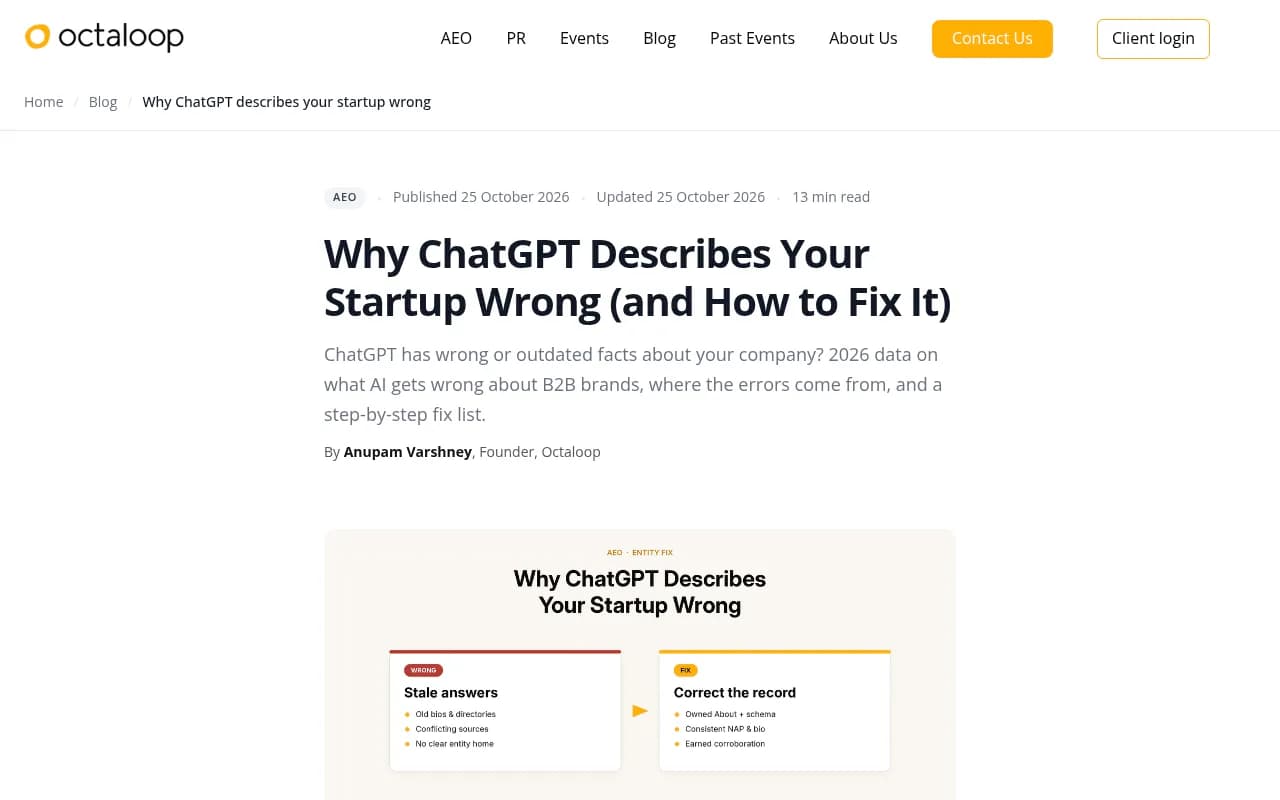
The causes fall into four buckets:
- Stale training data. You renamed the company, changed pricing or moved, and the model still remembers the old version.
- Live retrieval that leans on whatever ranks now. With web search on, ChatGPT summarizes the pages it finds, including bad ones.
- Conflicting records. Your Google Business Profile says one thing, your site another, and a two-year-old blog post a third. The model blends them into something that matches none.
- Pure hallucination or mistaken identity. One app developer reported ChatGPT calling their product "some sort of keylogger" with no basis in any source. These are the hardest to fix because there is nothing specific to correct.
Sending a complaint to OpenAI is not the fix. Telling the chatbot it's wrong only changes that one conversation. Thumbs-down feedback is worth doing, but nobody I've read has seen it flip an answer on its own. Treat it as a supporting signal.
Step 1: Capture the evidence
Before touching anything, document the problem. Save the exact prompt, the full answer, the date, and the model or mode you used. Screenshot the cited sources if any appear. Note whether web search was on.
Test more than one phrasing. Real buyers ask things like "is [brand] good for startups", "[brand] pricing" and "[brand] vs [competitor]". Run each in ChatGPT, then in Google AI Overviews, Gemini and Perplexity. They source differently, so a good answer in one tells you nothing about the others.
If you want to check several engines quickly without a paid tool, the free Perplexity answer engine is a useful second opinion because it always shows its sources.
Perplexity
Step 2: Diagnose training error or retrieval error
This is the step teams skip, and it's why they "fix" pages the AI never read and then decide correction is impossible.
Run the same prompt twice: once with web search off, once with it on.
| Result | Likely cause | Where to fix |
|---|---|---|
| Wrong with search off, right with search on | Stale training data | Keep publishing clear, dated facts; fix will arrive slowly with model updates |
| Wrong in both, with a source list | Retrieval error | Fix the cited pages, they are your work order |
| Wrong in both, no matching source anywhere | Hallucination or thin documentation | Publish plain-text facts and earn third-party coverage |
| Describes a different person or company | Entity confusion | Strengthen entity data: schema, consistent profiles, disambiguating copy |
When the answer includes links, open each one and check which part of the claim it actually supports. The cited source list is your work order. Start there, not with your own site map.
Step 3: Separate factual errors from framing problems
"ChatGPT says we have no API" is a correction job. "ChatGPT describes us as expensive and dated" is a sentiment and positioning job with a different playbook. Mixing them wastes effort. Factual errors get a source fix. Framing problems need new reviews, comparison pages and fresh coverage that change the overall picture.
Step 4: Look at which sources shape the answer
Promptwatch Data has two numbers that matter here. For brand-specific prompts, only 21.3% of ChatGPT responses cite 10 or more domains, and the most common count is 5 domains (14.9% of responses). That's from Promptwatch's unique-domains report covering Sep 28 to Oct 4, 2026. A short source list means each source carries more weight, so one outdated review site on that list can define you.
The second number is about what gets cited. In Promptwatch's content-type data for the same week, branded prompts cite product pages (23.3%) and landing pages (22.8%) for almost half of citations. Reviews rise to 5.6%, more than three times their overall share, and FAQ pages reach 4.8%.
Practically, that means your homepage, product pages, pricing page and docs are the first things to get right, followed by the review sites on your short source list.
Step 5: Fix the source
Fix pages you control
Compare copy across your whole site. Find every place the wrong claim, or its old version, lives: old pricing, retired features, previous names, outdated About pages. Then:
- State your key facts in plain text, not buried in images or PDFs. Who you are, what you sell, who it's for, pricing, location, founding date.
- Date the page so a model can tell it's current.
- Add a plain-language FAQ page about the brand. Branded prompts cite FAQ pages above their overall share.
- Make structured data and profiles agree with the copy. A schema tool such as Schema App can help if you have many pages.
- Update useful old pages. Redirect them if a newer page replaces them.
Fix pages you don't control
Contact the owners of the third-party pages the answer cites. Request corrections on directories, review profiles, Wikipedia-style reference pages and old articles. Keep your listings consistent everywhere. Local and multi-location brands can use listing managers like Yext or Synup to keep profiles in sync.
If you can't get a bad source changed, outvote it. Publish accurate pages, collect reviews on trusted sites, and publish your own comparison pages, then make sure third-party comparison and review pages describe you accurately.
Pick the right kind of fix
How long a fix lasts depends on the content type. From Promptwatch's half-life study (pages cited on July 6, 2026, tracked to Oct 4):
| Content type | Still cited after 30 days | Still cited after 60 days |
|---|---|---|
| Landing pages | 78% | 69% |
| Docs | 76% | 67% |
| Comparisons | 72% | 63% |
| Product pages, reviews, how-tos | n/a | about 55% |
| News | half gone by day 36 | 41% |
A corrected landing, docs or pricing page keeps working for months. A press release or news mention is a five-week patch at best. Spend your effort accordingly.
Step 6: Force a recrawl
A fixed page does nothing if the bot never re-reads it. Request reindexing in Google Search Console when it's appropriate, update your sitemap, and make sure robots.txt isn't blocking AI crawlers like GPTBot, OAI-SearchBot and ChatGPT-User.
I would check this before anything else if corrections aren't landing. Crawler access is a common silent failure. Promptwatch's AI crawler logs show IP-verified bot visits and which pages they fail on, and the free Agentic Readiness Check tells you which AI crawlers can read your site. I haven't verified how much a Search Console recrawl request influences ChatGPT specifically, so treat it as housekeeping, not a lever.
If you use IndexNow, a tool like IndexerNow can push changed URLs to participating engines.
Step 7: Submit feedback, then re-test
Thumbs-down the wrong answer and state the specific false fact in the comment, on every platform where it appears. OpenAI also has a privacy portal where you can submit a personal-data request to stop specific information about a person from appearing in responses. It's discretionary, it isn't a court order, and it does nothing to the underlying web pages. I haven't re-verified the current process, so check OpenAI's own help pages before relying on it.
Then re-run your saved prompts in the same mode as your baseline. Repeat until the answer flips. Don't judge from a single run, since answers vary. Run each prompt several times and look at the pattern.
How long does it take
One third-party estimate puts ChatGPT corrections at roughly 2 to 6 months because of the mix of training data and live search. That matches what the data suggests: retrieval-driven errors can flip in weeks once the cited source changes, while training-driven ones wait for model updates. Plan for a monthly check, not a one-off.
Step 8: Monitor so it doesn't come back
Manual spot checks work for a handful of prompts. They don't scale to dozens of prompts across five engines and several markets. This is where a monitoring platform earns its place.
Promptwatch tracks how ChatGPT, Gemini, Claude, Perplexity and Google AI Overviews mention and cite your brand, using their real interfaces. Its Brand Narrative feature pulls out the individual claims AI makes about you, such as "lacks a mobile app" or "affordable for small teams", and Fact Check (Business plan and above) lets you mark a claim inaccurate and then finds the pages on your site that state it. That's exactly the diagnosis step above, automated. Page Tracker then shows whether a corrected page gets cited, and crawler logs show whether the bots read it.

There is a free starting point too: the free AI visibility report scans how ChatGPT, Gemini and Perplexity describe your brand. Pricing starts at $95/month for Essential, and Fact Check sits on Business at $579/month, so confirm current plans at promptwatch.com/pricing.
Other options in the same category, depending on budget and need:
| Tool | Angle | Notes |
|---|---|---|
| Promptwatch | Monitoring, claim-level Brand Narrative, Fact Check, content fixes, crawler logs | End-to-end loop from detection to correction |
| LLMClicks | AI visibility tracking with hallucination detection | Focused on spotting wrong claims |
| Searchable | Action-oriented AI visibility analytics | Published the misinformation study cited above |
| Otterly.AI | Affordable mention tracking | Monitoring only |
| Peec AI | Monitoring without optimization | Lighter-weight dashboards |
For more options, the GEO software directory at bestgeosoftware.com lists dozens of trackers.
What if the wrong answer won't die
- Check that you fixed the source ChatGPT actually cited, not the one you assumed.
- Look for second-order sources: a directory that scraped the bad page, or an aggregator repeating it.
- Add more accurate, consistent sources than there are wrong ones.
- If the claim is pure hallucination with nothing to correct, publish the fact clearly and earn third-party coverage that states it.
- Treat legal escalation as a parallel track for documented harm, never a substitute for the source-level fix. Defamation, privacy and safety issues belong with counsel.
One caution on reading headlines: studies disagree on error rates because they measure differently. Broadcastwell looked at the best-documented software vendors and found 5.8% of verifiable statements wrong or stale, but about 30% of statements couldn't be verified from vendor pages at all. That second number is the real lesson. If your own pages don't state a fact clearly, nobody, human or model, can confirm it.
A quick checklist
- Save the prompt, answer, date and mode.
- Test with search on and off.
- Open every cited source.
- Label each issue as factual or framing.
- Fix your pages first: plain text, dated, consistent.
- Request corrections on third-party pages.
- Confirm AI crawlers can reach the updated pages.
- Submit feedback, then re-test weekly.
- Monitor monthly so regressions get caught early.
The unglamorous truth is that this is source hygiene. Fix the page the model read, make sure it can read the new version, and run the same prompt again until the answer changes.