MyEdit Review 2026
Quick browser-based editing tool for creating and optimizing visual content specifically for social media posts and stories.
Summary
- Best for: Social media creators, podcasters, and casual designers who need quick AI-powered edits without learning complex software
- Standout strength: Unusually broad feature set spanning image, audio, and video editing in one browser tool -- most competitors specialize in just one medium
- Key limitation: Credits system can get expensive for heavy users; lacks the depth and control of desktop tools like Photoshop or Premiere Pro
- Pricing: Free tier available; Audio Pro Plan $5/month ($60/year), Creator Pro Plan $7/month ($84/year)
- Bottom line: Solid all-in-one option for quick creative tasks, but power users will hit the ceiling fast
MyEdit is CyberLink's browser-based creative platform that tries to be a Swiss Army knife for content creators. Instead of juggling separate tools for photos, audio, and video, you get 40+ AI-powered features in one place. It's the web version of CyberLink's desktop suite (PhotoDirector, PowerDirector, AudioDirector), stripped down and rebuilt around speed and accessibility.
The tool launched as CyberLink pivoted toward AI-assisted workflows around 2023-2024. The company -- a 30-year-old Taiwanese software maker known for desktop multimedia apps -- clearly saw the writing on the wall: creators want instant results without installations or subscriptions to five different apps. MyEdit is their answer to Canva, Descript, and the flood of single-purpose AI tools.
Who uses this? Three main groups. Social media managers cranking out Instagram posts and TikTok clips. Podcasters who need transcription, noise removal, and voice enhancement but don't want to learn Audacity. Casual designers making birthday cards, memes, or quick product mockups. It's not built for professional photographers or video editors -- it's built for people who need "good enough" results in under five minutes.
Image Editing & AI Generation
AI Image Generator: Text-to-image creation using prompts. You type "cyberpunk cat in neon city", pick a style (realistic, anime, oil painting, etc.), and get results in 20-30 seconds. The model feels like a fine-tuned Stable Diffusion variant -- decent quality but not DALL-E 3 level. Good for social graphics, not portfolio work.
AI Face Swap: Upload two photos, swap the faces. Works surprisingly well for memes and joke content. The edge blending is better than most free face swap tools, though lighting mismatches still happen. Popular use case: swapping your face onto movie posters or historical photos.
AI Replace: Select an object in a photo, describe what you want instead, and the AI repaints it. "Replace the car with a bicycle" or "change the sky to sunset". This is generative fill, similar to Photoshop's version but less precise. You'll often need 2-3 tries to get it right.
Background Remover & Changer: One-click background removal for product photos or portraits. Then either leave it transparent or swap in a new background from their library (beaches, offices, abstract gradients). The edge detection is solid for clean shots but struggles with flyaway hair or complex edges.
AI Image Extender: Expand the canvas of a photo and let AI fill in the new space. Useful when you need a square image turned into a wide banner. The AI tries to match the existing content, with mixed results -- sometimes seamless, sometimes obviously synthetic.
Object Removal: Click on unwanted objects (people, power lines, logos) and the AI erases them. Works well on simple backgrounds, less so on complex textures. Faster than Photoshop's Content-Aware Fill but not as smart.
Image Enhancer: One-click upscaling and sharpening. Takes a blurry or low-res photo and improves clarity. Not magic -- you can't turn a 480p image into a crisp 4K shot -- but it does help with slightly soft photos.
AI Hairstyle & Outfit Generators: Upload a portrait, try different hairstyles or outfits. Fun for experimenting before a real haircut or shopping trip, but the results are more "preview" than "photorealistic". The outfit generator especially struggles with body proportions.
Cartoonize Effect & AI Filters: Turn photos into cartoon/anime styles or apply artistic filters (watercolor, sketch, pop art). These are hit-or-miss -- some styles look great, others look like a bad Instagram filter from 2014.
Audio Editing & AI Tools
Speech to Text: Upload an audio file (or record directly), get a text transcript with timestamps. Supports 20+ languages. Accuracy is comparable to Otter.ai or Descript for clear audio -- around 90-95% with a decent mic. Background noise tanks the accuracy fast. You can export as .SRT for subtitles.
Text to Speech: Type text, pick a voice (male/female, various accents and languages), generate audio. The voices are neural TTS -- better than robotic old-school TTS but still noticeably synthetic. Good for voiceovers when you don't want to record yourself. Supports SSML tags for controlling pace and emphasis.
AI Song Generator (Lyrics to Song): Paste in lyrics, pick a genre (pop, rock, hip-hop, etc.), and the AI generates a full song with vocals and instrumental. This is the wildest feature -- it's basically Suno or Udio built into the platform. Quality varies wildly. Sometimes you get a surprisingly catchy 2-minute track, other times it's a garbled mess. Fun for demos or joke songs, not for actual releases.
Audio Denoise & Wind Remover: Remove background noise or wind rumble from recordings. The denoise works well for hum, hiss, and room tone. Wind removal is hit-or-miss -- it can reduce wind but sometimes makes voices sound muffled.
Speech Enhancement: AI-powered voice cleanup that goes beyond simple noise removal. It tries to regenerate the voice to sound clearer and more professional, even if the original recording was rough. Useful for outdoor interviews or phone recordings.
Vocal Remover: Extract vocals or instrumentals from a song. Upload a track, get separate vocal and instrumental stems. Quality is decent for modern pop/rock with clear separation, less so for complex mixes. Comparable to free tools like Lalal.ai's basic tier.
Voice Changer: Pitch-shift or apply effects to voices (deeper, higher, robotic, echo). Basic but functional. Not as flexible as dedicated voice changers like Voicemod.
Podcast Studio: A bundled workflow for podcasters -- record or upload audio, denoise, enhance speech, add intro/outro music, export. It's not a full podcast editor (no multi-track timeline), but it handles the most common cleanup tasks.
Audio Trimmer & BPM Finder: Trim audio clips to specific timestamps. BPM Finder analyzes a song and tells you the tempo -- useful for DJs or video editors syncing to music.
Video Editing & Animation
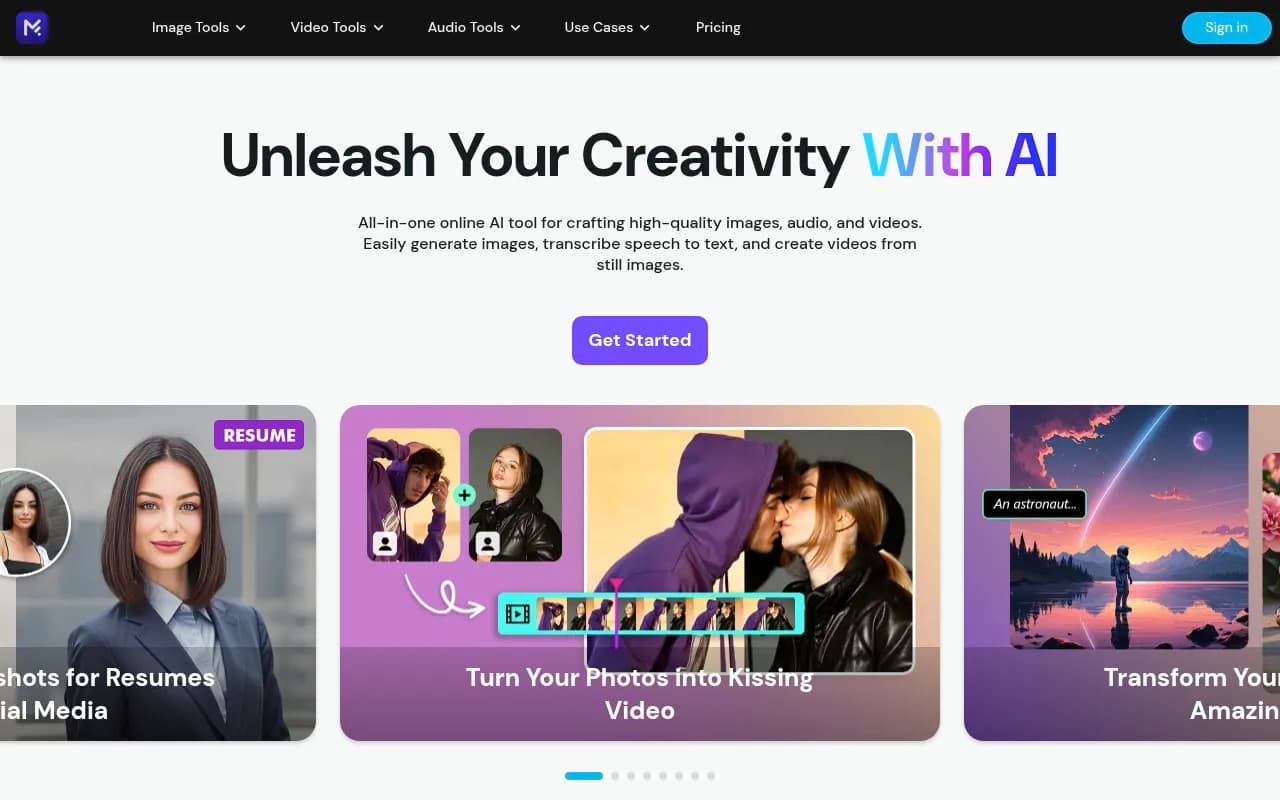
Image to Video (Animate Photo): Upload a still photo, and the AI animates it into a short video. The most popular use case is the "AI Kissing Generator" -- upload two portraits, and it generates a video of them kissing. Sounds gimmicky (it is), but it went viral on social media. The animation quality is decent for faces, less so for full-body shots. You can also animate landscapes, pets, or objects with varying results.
Character Motion Swap (Wan-2-2 Animate): Upload a reference video of someone dancing or moving, then apply that motion to a still image of a character. The character mimics the reference motion. This is motion transfer tech similar to DeepMotion or Runway's motion tools. Works best with clear, full-body reference videos.
Text to Video: Type a prompt, get a short generated video clip. This is early-stage AI video generation -- think Runway Gen-2 or Pika Labs quality from mid-2024. Clips are 3-5 seconds, often surreal or glitchy. Not reliable enough for serious projects, but fun for experimental content.
Video Enhancer: Upscale and sharpen video footage. Similar to Topaz Video AI but less powerful. Helps with slightly soft footage but won't turn 480p into crisp 4K.
Who Should Use MyEdit
MyEdit makes sense for three specific groups. First, social media managers and influencers who need to pump out content fast. You're making Instagram carousels, TikTok thumbnails, YouTube shorts -- stuff that needs to look decent but doesn't require pixel-perfect precision. The breadth of tools means you can handle image edits, audio cleanup, and video clips without switching apps.
Second, podcasters and YouTubers who need audio cleanup and transcription but don't want to learn Audacity or pay for Descript. The speech-to-text and audio enhancement tools are legitimately useful, and the podcast studio workflow bundles the most common tasks. The voice isolation and noise removal are good enough for most amateur recordings.
Third, casual creators making personal projects -- birthday videos, meme edits, hobby content. The AI face swap, hairstyle generator, and photo animation tools are fun to play with, and the free tier gives you enough credits to experiment.
Who should skip it? Professional designers, photographers, and video editors. MyEdit lacks the precision, control, and output quality of desktop tools like Photoshop, Premiere Pro, or DaVinci Resolve. You can't work in layers, adjust curves, or fine-tune color grading. It's a quick-edit tool, not a professional suite.
Also skip it if you need heavy batch processing or automation. MyEdit is built for one-off edits, not processing 500 product photos or automating a video pipeline.
Team size: This is a solo creator tool. There's no collaboration features, no shared workspaces, no commenting or version control. If you're a team of 3+ people working on the same project, you need something like Canva for Teams or Frame.io.
Integrations & Ecosystem
MyEdit is a standalone web app with minimal integrations. You can't connect it to Google Drive, Dropbox, or cloud storage -- you upload files manually. No Zapier integration, no API for developers. The workflow is: upload file, edit, download result. That's it.
The one connection is to CyberLink's desktop apps (PhotoDirector, PowerDirector, AudioDirector). If you subscribe to those, you get extra credits in MyEdit. But there's no seamless handoff -- you can't start an edit in MyEdit and finish it in PhotoDirector.
No mobile app. It's browser-only, which works on phones but the interface isn't optimized for small screens. Most tools require a desktop or tablet.
Export options are basic: download as JPG, PNG, MP4, MP3, or WAV. No direct publishing to Instagram, YouTube, or TikTok. No cloud storage of your projects -- everything is local downloads.
Pricing & Value
MyEdit uses a freemium model with credits. Every AI feature costs credits. Simple tasks (background removal, image enhancement) cost 1-2 credits. Complex tasks (AI image generation, face swap, video animation) cost 5-20 credits.
Free tier: You get a small number of credits per month (exact amount varies, but it's enough for 5-10 basic edits). Good for trying the platform, not for regular use.
Audio Pro Plan: $5/month ($60/year). Focused on audio tools -- more credits for transcription, voice synthesis, and audio cleanup. Best for podcasters who don't need the image/video features.
Creator Pro Plan: $7/month ($84/year). Full access to image, audio, and video tools with a larger monthly credit pool. This is the tier most active users will need.
You can also buy credit packs à la carte if you run out mid-month. Pricing for packs isn't publicly listed (you have to log in to see it), which is annoying.
How does this compare to competitors? Canva Pro is $13/month and includes design templates, brand kits, and team collaboration -- more expensive but more features for visual design. Descript is $12/month for audio/video editing with transcription -- similar price but more powerful for long-form content. Runway ML is $12/month for AI video generation -- pricier but higher quality. MyEdit is cheaper than all of these, but you're trading depth for breadth. It does a lot of things adequately; competitors do fewer things excellently.
The credits system is frustrating. You never know exactly how many edits you'll get per month because different tasks cost different amounts. If you're doing heavy AI generation (images, videos, songs), you'll burn through credits fast. The $7/month tier might only give you 20-30 AI image generations, which isn't much if you're making daily social posts.
Value verdict: Good deal if you need occasional edits across multiple media types. Poor deal if you're a power user in any one category -- you'll hit the credit limit and end up paying more than a specialized tool.
Strengths & Limitations
What MyEdit does well:
- Breadth of features: 40+ tools spanning image, audio, and video in one place. Competitors usually specialize in one medium.
- Speed: Most edits finish in under 30 seconds. No rendering queues or long waits.
- No installation: Browser-based means it works on any device, no downloads or updates.
- Ease of use: The interface is simple -- upload, click a button, download. No learning curve.
- Audio transcription quality: The speech-to-text is legitimately good, comparable to Otter.ai or Descript for clear audio.
Where it falls short:
- Credits system is opaque and limiting: You never know exactly how many edits you'll get, and heavy users will constantly run out. The pricing page doesn't clearly explain credit costs per feature.
- Lacks depth in every category: It's a jack-of-all-trades, master of none. Photoshop is better for images, Descript is better for audio, Runway is better for video. MyEdit is "good enough" at everything but not great at anything.
- No collaboration or team features: Can't share projects, leave comments, or work with others. It's a solo tool.
- AI quality is inconsistent: Some features (face swap, transcription) work well. Others (text-to-video, outfit generator) are hit-or-miss. You'll often need multiple attempts.
- No integrations or API: Can't connect to other tools, automate workflows, or build on top of it. It's a closed ecosystem.
- Limited export options: No direct publishing to social platforms, no cloud storage, no project versioning.
Bottom Line
MyEdit is a solid choice if you're a solo content creator who needs quick edits across images, audio, and video without learning complex software. The breadth of features is genuinely useful -- you can remove a background, transcribe a podcast, and animate a photo all in one place. The $7/month Creator Pro Plan is cheaper than subscribing to separate tools for each task.
But it's not a professional tool. The lack of precision, the credits system, and the inconsistent AI quality mean you'll hit frustrations fast if you're doing serious work. It's best for social media content, hobby projects, and quick experiments -- not for client deliverables or portfolio pieces.
Best use case in one sentence: A content creator making 5-10 social posts per week who needs fast, decent-quality edits without juggling multiple apps.
Tags:
Similar and alternative tools to MyEdit