AIOSEO Review 2026
All-in-one SEO plugin for WordPress that includes AI-generated meta descriptions, schema markup, link building suggestions, and content analysis.
Key takeaways
- AIOSEO is a comprehensive WordPress SEO plugin used by over 3 million websites, covering everything from on-page optimization to schema markup, local SEO, and AI content generation
- Strong choice for WordPress site owners who want a single plugin to handle most SEO tasks without needing separate tools
- The free version is genuinely useful, but most of the compelling features (Link Assistant, Redirection Manager, Local SEO, advanced schema) require a paid plan
- Annual-only billing is a real limitation -- there's no monthly payment option, which makes it harder to test before committing
- Not a tool for AI search visibility or tracking how your brand appears in ChatGPT, Perplexity, or other LLMs -- that's a separate category entirely
AIOSEO (All in One SEO) has been around since 2007, making it one of the oldest WordPress SEO plugins on the market. It competes directly with Yoast SEO and Rank Math for the title of "default SEO plugin" for WordPress sites, and with over 3 million active installs, it's clearly doing something right. The plugin is built and maintained by Awesome Motive, the same company behind WPForms, MonsterInsights, and OptinMonster -- a portfolio that gives them significant distribution and cross-sell advantages within the WordPress ecosystem.
The core pitch is simple: you shouldn't need five different plugins to handle SEO on a WordPress site. AIOSEO bundles on-page analysis, technical SEO, schema markup, local SEO, WooCommerce optimization, internal linking, redirects, and now AI content generation into a single interface. For most small-to-medium WordPress sites, that's a genuinely compelling offer. The plugin is designed to be approachable for beginners while still offering enough depth for experienced SEOs who want granular control.
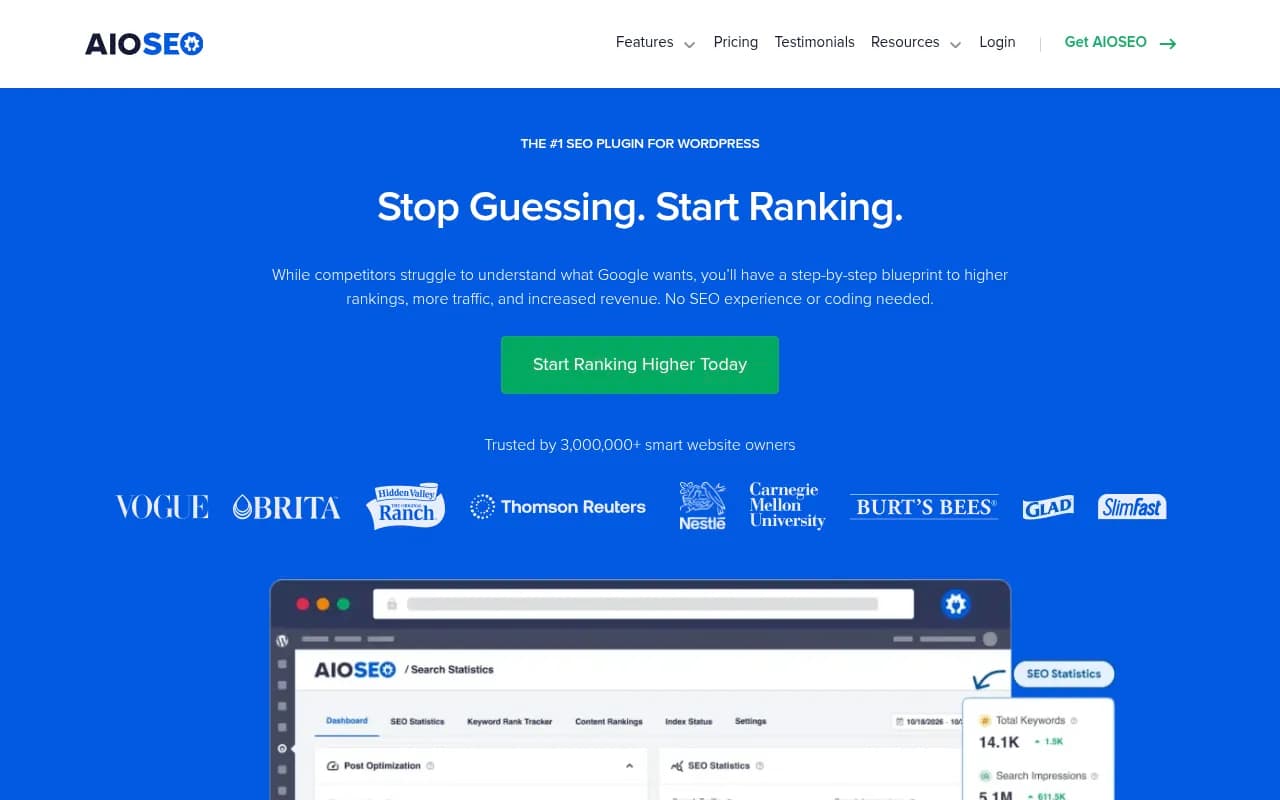
Notable customers listed on the site include Vogue, Brita, Thomson Reuters, Nestle, and Carnegie Mellon University -- a mix that suggests the plugin scales reasonably well beyond just personal blogs.
Key features
TruSEO score and content analysis
Every page and post gets a TruSEO score -- a numerical rating that reflects how well-optimized the content is for a target keyword. The analysis runs inside the WordPress editor and gives you a checklist of specific improvements: keyword in the title, meta description length, heading usage, image alt text, internal links, and so on. It's similar to Yoast's traffic light system but presented as a score rather than a color, which some users find more motivating. The checklist approach means you always know exactly what to fix, rather than just being told something is "orange."
AI Assistant and content generator
AIOSEO's AI Assistant can generate full blog posts, FAQs, key takeaways, and meta descriptions from text prompts. It also includes an image generator. This is positioned as a way to break through writer's block and produce SEO-optimized content faster. In practice, AI-generated content still needs editing, but having the tool inside WordPress rather than switching to a separate app is a genuine workflow improvement. The AI features are available on higher-tier plans.
Schema Generator (rich snippets)
The Schema Generator handles structured data without requiring any code. You can add schema for articles, products, recipes, reviews, FAQs, events, local businesses, and more. The plugin automatically outputs the correct JSON-LD markup, which is what Google prefers. This is one of AIOSEO's stronger features -- the schema catalog is broad, and the interface for configuring each schema type is more visual than what you get with Yoast's equivalent. Rich snippets (star ratings, recipe cards, product info) can meaningfully improve click-through rates from search results.
Link Assistant
Link Assistant scans your entire site and suggests internal linking opportunities as you write. It identifies pages that could link to each other based on content relevance and flags orphaned content (pages with no internal links pointing to them). You can accept or reject suggestions in bulk. This is a feature that used to require a separate plugin or manual auditing, and having it built in is useful for content-heavy sites. Competitors like Yoast don't have an equivalent built-in tool at this level.
Search Statistics and keyword rank tracker
AIOSEO pulls data from Google Search Console and displays it inside the WordPress dashboard -- keyword rankings, clicks, impressions, and position changes over time. The Keyword Rank Tracker goes further, letting you monitor specific keywords and track their movement. For most WordPress site owners, this removes the need to log into Google Search Console separately for day-to-day monitoring. The data is GSC data, so it's limited to Google, but that's where most organic traffic comes from anyway.
Local SEO module
The Local SEO module lets you add business hours, multiple locations, contact information, and Google Maps integration. It outputs LocalBusiness schema automatically. For brick-and-mortar businesses or service-area businesses trying to rank in Google Maps and local search results, this is a significant feature. Multi-location support is included, which is useful for franchises or businesses with several physical locations.
Redirection Manager
The Redirection Manager handles 301, 302, and 307 redirects without needing a separate plugin like Redirection. It also monitors for 404 errors and lets you set up automatic redirects when URLs change. For sites that frequently update content or restructure their URL hierarchy, this prevents ranking losses from broken links. The 404 monitoring is particularly useful -- you can see which URLs are returning errors and fix them before they cause significant traffic drops.
WooCommerce SEO
WooCommerce integration adds SEO controls specifically for product pages and category pages. You can set up product schema, optimize product titles and descriptions for search, and control how product pages appear in search results. For eCommerce sites running WooCommerce, this is more targeted than the generic page optimization you'd get from a standard SEO plugin.
Smart XML sitemaps
AIOSEO generates XML sitemaps automatically and pings Google and Bing when content is updated. You can include or exclude specific post types, taxonomies, or individual pages. Video sitemaps and news sitemaps are also supported on higher plans. This is table stakes for any SEO plugin, but AIOSEO's implementation is solid and configurable.
Social media integration
You can customize how pages appear when shared on Facebook, Twitter/X, LinkedIn, and Pinterest -- setting custom titles, descriptions, and images for each platform. This is Open Graph and Twitter Card implementation, which most SEO plugins handle, but AIOSEO's interface for managing it per-post is clean and straightforward.
Who is it for
AIOSEO is best suited for WordPress site owners who want comprehensive SEO coverage without managing multiple plugins. The clearest use case is a small business owner or blogger who needs to handle everything from meta tags to schema markup to redirects but doesn't have the time or budget to hire an SEO specialist. The setup wizard gets you configured in minutes, and the TruSEO checklist makes ongoing optimization approachable even without deep SEO knowledge.
For digital agencies managing multiple client WordPress sites, AIOSEO's Pro and Elite licenses allow use on multiple sites, and the affiliate program (20% commission) gives agencies a financial incentive to recommend it. Agencies that primarily work with WordPress clients and need a reliable, full-featured plugin to deploy across accounts will find it fits that workflow well. The WooCommerce SEO module makes it particularly strong for agencies with eCommerce clients.
Content-heavy sites -- news publishers, large blogs, affiliate sites -- benefit most from the Link Assistant and AI content features. Sites with hundreds or thousands of posts often have significant internal linking gaps and orphaned content, and having automated suggestions built into the editor speeds up the optimization process considerably.
Who should probably look elsewhere: developers or SEO professionals who want maximum technical control and prefer to configure structured data manually. Also, anyone whose primary concern is tracking or improving visibility in AI search engines like ChatGPT, Perplexity, or Google AI Overviews -- AIOSEO is a traditional SEO plugin and doesn't address that use case at all. For AI search visibility, that's a separate category of tools.
Integrations and ecosystem
AIOSEO integrates directly with Google Search Console for pulling ranking and traffic data into the WordPress dashboard. It also connects with Google Analytics (via MonsterInsights, Awesome Motive's analytics plugin) for more detailed traffic reporting.
The plugin works with all major WordPress page builders: Elementor, Divi, Beaver Builder, Gutenberg (the default block editor), and the Classic Editor. WooCommerce integration is native. It also supports multisite WordPress installations.
There's no public REST API for AIOSEO itself, but since it's a WordPress plugin, developers can interact with it programmatically through WordPress hooks and filters. The plugin outputs standard JSON-LD schema, so the structured data it generates is compatible with any schema testing tool.
Import functionality lets you migrate settings from Yoast SEO, Rank Math, SEOPress, and other plugins -- which reduces the friction of switching. This is a practical feature that competitors also offer, but it's worth noting that AIOSEO's importer covers most of the major alternatives.
There's no standalone mobile app -- it's a WordPress plugin, so you access it through the WordPress admin on any device. The WordPress admin is mobile-responsive, but it's not optimized for mobile SEO management.
Pricing and value
AIOSEO offers a free version available on WordPress.org with basic on-page SEO features: meta tags, basic sitemaps, and social media integration. It's a legitimate starting point, not a crippled demo.
Paid plans are annual-only -- there's no monthly billing option, which is worth knowing upfront:
- Basic: covers 1 site, includes core SEO features
- Plus: covers up to 3 sites, adds more advanced features
- Pro: covers up to 10 sites, unlocks Link Assistant, Redirection Manager, Local SEO, advanced schema
- Elite: covers up to 100 sites, adds WooCommerce SEO and priority support
The site currently advertises 50% off the first year (described as "6 months free"), which is a common promotional pricing approach. Without the discount, plans typically run from around $49/year for Basic up to several hundred dollars for Elite. The exact current pricing requires checking the pricing page directly, as promotional rates change.
Compared to Yoast SEO Premium (around $99/year for 1 site) and Rank Math Pro (around $59/year), AIOSEO's per-site pricing is competitive at the lower tiers. The Elite license for agencies covering up to 100 sites offers good value compared to buying individual licenses.
The annual-only billing is the main friction point. If you're not sure whether AIOSEO is the right fit, you're committing to a full year upfront. The free version helps de-risk this somewhat, but the free version doesn't include the features most people actually want.
Strengths and limitations
What it does well:
- The breadth of features in a single plugin is genuinely impressive. Replacing AIOSEO would require at least 3-4 separate plugins (an SEO plugin, a redirect manager, a schema plugin, a local SEO plugin), which creates compatibility and maintenance overhead.
- The TruSEO score and checklist system is one of the more actionable content optimization interfaces in the WordPress plugin space. It tells you specifically what to fix, not just that something is wrong.
- Link Assistant is a standout feature that competitors don't match at this level. For sites with large content libraries, automated internal link suggestions save significant time.
- The schema generator covers a wide range of schema types with a visual interface, making structured data accessible to non-developers.
- The import tool from competing plugins makes switching relatively painless.
Limitations:
- Annual-only billing with no monthly option is a real barrier for users who want to try before committing financially.
- The AI content generation features, while useful, are not meaningfully differentiated from what you'd get using ChatGPT or Claude directly. The main benefit is workflow convenience (staying inside WordPress), not output quality.
- AIOSEO has no capability for tracking or optimizing visibility in AI search engines. As more search traffic shifts to ChatGPT, Perplexity, Google AI Overviews, and similar platforms, this is a growing gap. Traditional on-page SEO optimization doesn't directly translate to AI citation visibility, and AIOSEO doesn't address that problem.
- The plugin can feel heavy on smaller shared hosting setups. Sites with limited server resources sometimes report performance impacts, though this has improved in recent versions.
Bottom line
AIOSEO is a solid, mature WordPress SEO plugin that earns its place as one of the top choices in its category. For WordPress site owners who want to handle on-page SEO, technical SEO, schema markup, local SEO, and internal linking without managing a stack of separate plugins, it delivers real value. The free version is a legitimate starting point, and the paid plans are reasonably priced for what they include.
The best use case in one sentence: a WordPress-based business or content site that wants one plugin to handle all traditional SEO tasks, from meta tags to redirects to rich snippets, without needing an SEO specialist on staff.
Tags:
Frequently asked questions
What is AIOSEO?
Is there a free version of AIOSEO?
How much does AIOSEO cost?
How does AIOSEO compare to Yoast SEO and Rank Math?
Can I use AIOSEO on client sites?
Does AIOSEO help with AI search visibility (ChatGPT, Perplexity, etc.)?
Similar and alternative tools to AIOSEO