Verlynk Review 2026
Create optimized landing pages for social bio links, track click performance, and manage multiple links from one customizable page.
Key Takeaways:
- Aggressive pricing: Free tier supports 3 accounts; paid plans start at $9.99/month for 10+ accounts -- roughly 80% cheaper than Buffer, Hootsuite, or Sprout Social
- Unified inbox: Manage DMs, comments, and mentions from Instagram, Facebook, LinkedIn, TikTok, YouTube, and more in one place with canned responses and custom filters
- AI content tools: Built-in caption generator, hashtag suggestions, and AI-powered channel health analysis to identify growth blockers
- Multi-level approval workflows: Route posts through custom approval chains before publishing -- essential for agencies and brand teams
- Limitations: Newer platform (less brand recognition than incumbents), limited third-party integrations, no mobile app yet, analytics depth doesn't match enterprise tools like Sprout Social
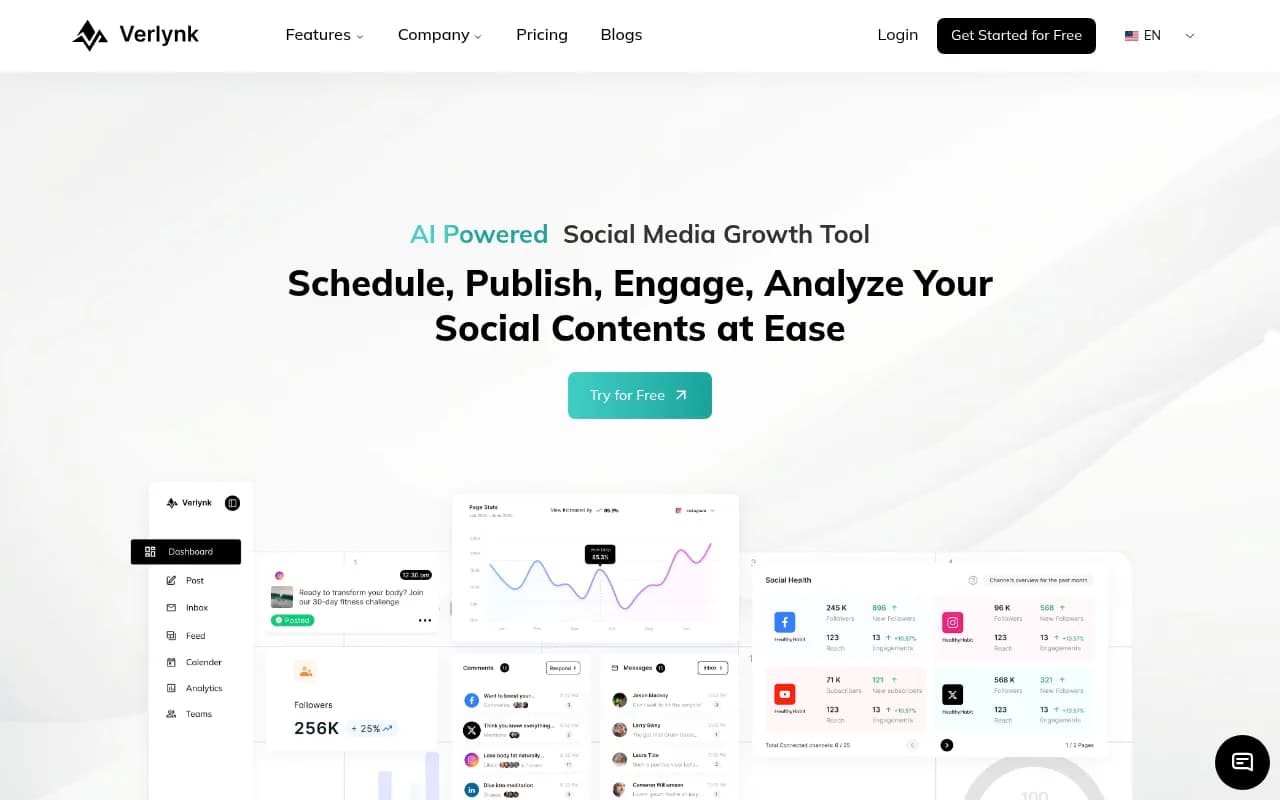
Verlynk is a social media management platform that entered a crowded market with a simple pitch: all the core features you actually use, at a fraction of the price. It's built for solo creators, small marketing teams, and agencies who need scheduling, inbox management, team collaboration, and analytics without paying $100+ per month per user.
The company positions itself as the budget-friendly alternative to Buffer, Hootsuite, Later, and Sprout Social. The core claim -- "80% less than other SMM tools" -- holds up when you compare feature sets. Where Buffer charges $12/month for 3 accounts and Hootsuite starts at $99/month for 1 user, Verlynk offers 10+ accounts for $9.99/month. The free tier (3 accounts) is more generous than most competitors.
Verlynk supports 10 platforms: Instagram, Facebook, LinkedIn, X/Twitter, YouTube, TikTok, Pinterest, Threads, Mastodon, and Bluesky. That's broader than many tools at this price point -- Later and Planoly focus heavily on Instagram/TikTok, while Hootsuite charges extra for YouTube and TikTok.
Publishing and Scheduling
The composer lets you write once and customize per platform. You draft a post, then tweak the caption, hashtags, or media for each network before publishing. Live previews show exactly how the post will render on Instagram vs LinkedIn vs TikTok -- helpful since character limits and image crops vary.
The AI caption generator analyzes your image or topic and suggests copy in different tones (professional, casual, humorous). It's not groundbreaking -- similar to what you'd get from ChatGPT with a good prompt -- but it's fast and built into the workflow. The hashtag tool suggests relevant tags based on your content and shows estimated reach, though it doesn't pull real-time trending data like RiteTag.
You can publish immediately, schedule for a specific time, or add posts to a smart queue. Queues are time slots you define (e.g. Mon/Wed/Fri at 10am, 2pm, 6pm) and Verlynk auto-fills them with queued content. This is standard in tools like Buffer and CoSchedule, but Verlynk lets you create multiple queues per account -- useful if you're managing different content themes or campaigns.
Bulk upload via CSV is supported. You prepare a spreadsheet with post text, media URLs, publish times, and platform tags, then import everything at once. Agencies managing 20+ client accounts will appreciate this.
Content Calendar
The calendar view shows all scheduled posts across accounts in a drag-and-drop interface. You can filter by platform, account, author, label, campaign, or post status (draft, scheduled, published, failed, needs approval). Multiple views -- week, month, list -- let you zoom in or out.
Color-coded labels and campaign tags help organize content. If you're running a product launch, you tag all related posts with "Q1 Launch" and filter the calendar to see only those. Campaign analytics later roll up performance for all posts in that campaign.
The calendar doesn't have a built-in content library or asset manager. You upload media directly when composing posts. Tools like Planable and Loomly offer centralized media libraries where you store brand assets and reuse them across posts -- Verlynk doesn't have this yet.
Unified Inbox
This is where Verlynk differentiates from cheaper tools like Buffer (which has no inbox) and Later (basic comment moderation only). The inbox aggregates DMs, comments, post mentions, and story replies from Instagram, Facebook, LinkedIn, YouTube, and TikTok into one feed.
You can filter by message type (DM, comment, mention), platform, account, or custom views you create. Canned responses let you save templated replies for common questions -- "Shipping takes 3-5 business days" or "Link in bio for pricing" -- and insert them with a click.
Internal notes and assignments let team members tag each other on specific messages. If a customer asks a technical question, the social manager can assign it to the support lead without leaving Verlynk. This is standard in Sprout Social and Agorapulse but rare in budget tools.
The inbox doesn't support live chat widgets for websites (like Intercom or Drift). It's purely for social platform messages. X/Twitter DMs are not yet supported, which is a gap if you rely on Twitter for customer service.
Team Collaboration and Approval Workflows
You can invite unlimited team members on all paid plans (even the $9.99 Individual plan). Custom roles let you define permissions -- who can publish, who can only draft, who can approve, who can access analytics.
Approval workflows route posts through one or more reviewers before publishing. You set up a workflow (e.g. "Content Creator -> Social Manager -> Brand Director") and assign it to specific accounts or campaigns. Posts enter a "Needs Approval" state and notify the next person in the chain. Approvers can leave comments, request changes, or approve.
This is critical for agencies and brand teams where junior creators draft content but senior staff must review before it goes live. Planable and Gain both offer similar workflows, but Verlynk includes it at $29.99/month vs Planable's $33/user/month.
The activity log tracks every action -- who created a post, who edited it, who approved it, who published it. Useful for accountability and auditing.
Analytics
Verlynk pulls native analytics from each platform: reach, impressions, engagement (likes, comments, shares, saves), follower growth, video views, and audience demographics. You can view metrics per post, per account, or rolled up across all accounts.
Campaign analytics aggregate performance for all posts tagged with a specific campaign. If you ran a Black Friday promotion across Instagram, Facebook, and TikTok, you see total reach, engagement, and clicks for that campaign in one report.
Platform-specific dashboards show deeper metrics -- Instagram Reels vs Feed posts, LinkedIn company page vs personal profile, YouTube watch time and retention curves. The depth is decent for small teams but doesn't match enterprise tools. Sprout Social and Hootsuite offer custom report builders, competitive benchmarking, and sentiment analysis -- Verlynk doesn't.
You can export reports as PDFs or CSV. No white-label reporting (custom branding for client reports), which agencies often want.
AI-Powered Channel Health Analysis
Verlynk's AI analyzes your connected accounts and identifies growth blockers: posting at wrong times, low engagement rates, missed revenue opportunities, audience mismatch. It suggests specific fixes -- "Post more Reels", "Engage with comments within 1 hour", "Your audience is most active at 7pm, not 2pm".
This is similar to what Metricool and Iconosquare offer, but Verlynk claims 99.2% accuracy and shows before/after projections. The AI also estimates earning potential based on your follower count, engagement rate, and niche -- useful for creators evaluating sponsorship rates.
The analysis requires you to connect your account and grant analytics permissions. It's not a one-time audit -- the AI continuously monitors and updates recommendations.
Integrations and Ecosystem
Verlynk integrates with the 10 social platforms listed above. No Zapier, Make, or API access yet, so you can't connect it to your CRM, email tool, or custom workflows. This is a significant limitation for agencies and SaaS companies that need data flowing between tools.
No browser extension, mobile app, or desktop app. You access Verlynk via web browser only. Competitors like Buffer and Hootsuite have mobile apps for on-the-go publishing and inbox management.
No link-in-bio tool (despite the original tagline mentioning "link management for social media bios"). If you need a Linktree alternative, you'll use a separate tool.
Who Is It For
Verlynk fits three groups:
Solo creators and small businesses managing 3-10 social accounts who need scheduling, basic analytics, and inbox management without paying $50+/month. If you're a freelance designer, local coffee shop, or fitness coach posting to Instagram, Facebook, and LinkedIn, the $9.99 Individual plan covers you. The AI caption generator and hashtag suggestions speed up content creation when you're doing everything yourself.
Small marketing teams (2-5 people) at startups, e-commerce brands, or nonprofits who need collaboration features and approval workflows. The $29.99 Team plan supports 20+ accounts, unlimited users, and multi-level approvals. You're not paying per seat like Hootsuite ($99/user) or Sprout Social ($249/user). The unified inbox keeps customer messages from falling through the cracks.
Agencies managing multiple clients who want to consolidate tools and cut costs. If you're managing 10-20 client accounts across Instagram, Facebook, LinkedIn, and TikTok, Verlynk's bulk upload, campaign tagging, and approval workflows handle the basics. The lack of white-label reporting and API access limits you if you're a larger agency with custom reporting needs.
Who should NOT use Verlynk: Enterprise brands needing advanced analytics, sentiment analysis, competitive benchmarking, or custom integrations. Teams that rely heavily on X/Twitter DMs or need a mobile app for field teams. Agencies that require white-label client reporting or API access for custom dashboards.
Pricing and Value
Three plans:
Free: 3 social accounts, basic scheduling and publishing, calendar view, inbox, analytics. No approval workflows, no AI channel analysis, no team collaboration. Good for testing the platform or managing a personal brand with minimal needs.
Individual ($9.99/month): 10+ social accounts, unlimited posts, AI caption generator, hashtag tools, unified inbox, analytics, team collaboration (unlimited users), activity log. No approval workflows. Best for solo creators or small businesses that don't need formal review processes.
Team ($29.99/month): 20+ social accounts (additional accounts $0 each), everything in Individual, plus multi-level approval workflows, advanced calendar filters, campaign analytics, AI channel health analysis. This is the sweet spot for small teams and agencies.
Annual billing offers a discount (not specified on the site, but typical SaaS discounts are 15-20%).
Compare to competitors:
- Buffer: $12/month for 3 accounts, $120/month for 10 accounts (Essentials plan). No unified inbox.
- Hootsuite: $99/month for 1 user and 10 accounts (Professional plan). Inbox included.
- Later: $25/month for 1 user and 6 accounts (Starter plan). Basic inbox, no approval workflows.
- Sprout Social: $249/user/month (Standard plan). Enterprise-grade analytics and inbox.
Verlynk's claim of "80% less" is accurate when comparing feature-for-feature. You're trading brand recognition, mobile apps, and advanced integrations for significant cost savings.
Strengths
Aggressive pricing: The $9.99 and $29.99 tiers undercut nearly every competitor while including features (unified inbox, approval workflows, unlimited users) that others charge extra for or don't offer at budget tiers.
Unified inbox with canned responses: Managing comments and DMs from one place is a huge time-saver. The ability to create custom views and assign messages to team members is rare at this price.
Approval workflows on the Team plan: Multi-level approvals are typically an enterprise feature. Verlynk includes them at $29.99/month, making it accessible for small agencies and brand teams.
Broad platform support: 10 platforms including newer ones (Threads, Bluesky, Mastodon) that many competitors haven't added yet. TikTok and YouTube support at this price is notable.
AI content tools built in: Caption generation and hashtag suggestions are convenient when you're staring at a blank screen. The channel health analysis provides actionable feedback, not just vanity metrics.
Limitations
No mobile app: You can't publish on the go or respond to messages from your phone unless you use a mobile browser. Buffer, Hootsuite, and Later all have polished mobile apps.
No API or Zapier integration: You can't connect Verlynk to your CRM, email tool, or custom workflows. This limits automation and data syncing for agencies and SaaS companies.
No white-label reporting: Agencies that send branded reports to clients will need to export data and build reports manually in Google Slides or Canva.
X/Twitter DM support missing: If you rely on Twitter for customer service or community management, you'll need a separate tool for DMs.
Analytics depth: The reporting is solid for small teams but lacks custom report builders, competitive benchmarking, sentiment analysis, and advanced segmentation that enterprise tools offer.
Newer platform: Verlynk doesn't have the track record or user base of Buffer or Hootsuite. Reviews on G2 (4.9/5) and Capterra (5.0/5) are positive but limited in number.
Bottom Line
Verlynk is a smart choice for solo creators, small marketing teams, and budget-conscious agencies who need scheduling, inbox management, team collaboration, and analytics without paying $100+/month. The unified inbox and approval workflows at $29.99/month are particularly strong value. You're sacrificing mobile apps, API access, and enterprise-grade analytics, but if those aren't dealbreakers, Verlynk delivers the core features at a fraction of the cost. Best use case: a 3-5 person marketing team at a startup or small agency managing 10-20 client accounts across Instagram, Facebook, LinkedIn, and TikTok who need approval workflows and don't want to pay per seat.
Tags:
Similar and alternative tools to Verlynk