Dashword Review 2026
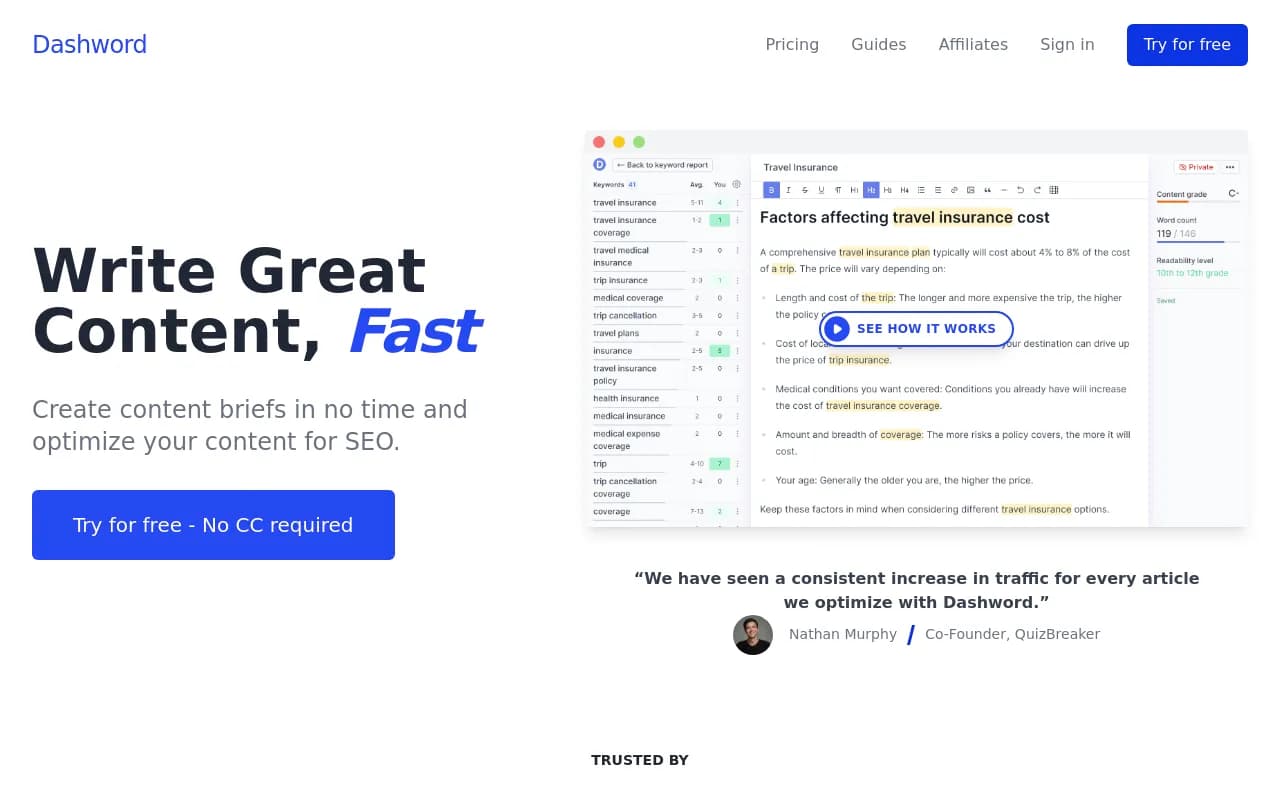
Dashword is SEO content optimization software for marketing teams and agencies. It generates content briefs, provides real-time optimization scoring, and monitors published pages for traffic drops and ranking opportunities.
Key takeaways
- Dashword covers the three core stages of content marketing: brief creation, on-page optimization, and post-publication monitoring
- Pricing starts at $39/month with a free trial (no credit card required), making it one of the more affordable options in the content optimization space
- Best suited for small-to-mid-size SEO teams and content agencies that need to scale brief production without hiring more researchers
- The tool focuses on traditional SEO content optimization and does not track AI search visibility, brand mentions in LLMs, or citations in ChatGPT/Perplexity responses
- Compared to heavier tools like MarketMuse or Surfer SEO, Dashword trades some analytical depth for speed and simplicity
Dashword is a content optimization platform built for SEO teams that need to move fast. The core pitch is straightforward: give writers everything they need to produce well-optimized content without spending hours on manual research. It handles content brief generation, real-time SEO scoring inside an editor, and ongoing monitoring of published pages. The company positions itself as a leaner, more affordable alternative to tools like MarketMuse and Surfer SEO, and based on the feature set, that comparison holds up reasonably well.
The target audience is content marketers, SEO managers, and agencies that produce a consistent volume of articles and blog posts. If you're running a content operation where multiple writers need structured briefs and you want some quality control baked into the workflow, Dashword fits that use case cleanly. It's not trying to be an all-in-one SEO suite. It doesn't do backlink analysis, technical audits, or keyword research from scratch. It takes a keyword and helps you write something worth ranking for.
The product has been around for a few years and has built a small but loyal user base, with testimonials from teams at companies like QuizBreaker. It also offers a Google Docs add-on, which signals that the team understands where writers actually spend their time.
Key features
Content brief builder
This is the centerpiece of Dashword. Enter a target keyword and the tool pulls together competitor outlines, common questions, related topics, and suggested headings. The idea is to compress what would normally be 30-60 minutes of SERP research into a few minutes of clicking.
- Competitor outlines are pulled from top-ranking pages, so you can see what structure is working in your niche
- You can pick and choose sections from different competitors rather than copying any single outline
- The brief is shareable via a link, which is useful if you're working with freelance writers or an external content team
- The interactive builder lets you drag, reorder, and edit sections before sending
In practice, the brief quality depends heavily on the keyword. For competitive, well-documented topics, the output is solid. For niche or low-volume queries, the competitor data can be thin.
Content optimization editor
Once you're writing (or pasting in existing content), Dashword scores your content in real time. The score reflects how well you've covered the relevant topics, keywords, and questions that appear across top-ranking pages.
- The editor highlights missing terms and topics as you write
- A content score gives you a clear pass/fail-style signal on whether the content is ready to publish
- Frequently asked questions pulled from search results are surfaced so writers can address them directly
- The scoring is designed to be consistent, so if you're managing multiple writers, you can set a minimum score threshold as a quality gate
This is similar to how Surfer SEO's editor works, though Dashword's interface is generally considered simpler and less overwhelming for writers who aren't SEO-native.
Content monitoring
After you publish, Dashword doesn't just disappear. The monitoring module tracks your pages over time and flags issues.
- Traffic trend tracking alerts you when a page starts losing organic traffic
- Weekly automated keyword reports re-evaluate your content based on fresh SERP data
- A keyword rank tracker shows where your pages are sitting so you can identify quick wins
- An automated web crawler imports your pages without manual URL entry
This is a genuinely useful feature that a lot of content teams overlook. Most optimization tools stop at publication. Dashword's monitoring gives you a reason to come back and update content before rankings slip too far.
Google Docs add-on
Dashword has a Google Docs integration available through the Google Workspace Marketplace. This lets writers access optimization suggestions directly inside Google Docs without switching tabs. For teams that live in Google Docs, this removes a real friction point.
Free SEO tools
Dashword offers several standalone free tools on its website:
- A "People Also Search For" lookup
- A meta description generator
- A content optimization checker
- A content brief generator
These serve as lead-generation tools but are also genuinely functional for quick, one-off tasks. They're a good way to test the tool's output quality before committing to a paid plan.
API access
Dashword exposes an API, which means developers and larger teams can integrate brief generation or optimization scoring into their own workflows. The API docs are publicly available on the site. This is a differentiator for agencies that want to build Dashword's capabilities into a custom CMS or content pipeline.
Who is it for
Dashword fits best with in-house SEO teams at small-to-mid-size companies that publish content regularly, say 10-50 articles per month, and need a structured process without a lot of overhead. A content manager at a SaaS company who's briefing two or three freelance writers each week will get real value from the brief builder and the shareable link feature. The monitoring module is particularly useful for teams that have an existing content library and want to protect rankings without manually auditing every page.
Agencies managing content for multiple clients are another natural fit, especially at the $99/month tier. The ability to generate briefs quickly and share them with writers without giving clients access to the full tool is a practical workflow advantage. The Google Docs add-on also matters here, since most agency writers work in Google Docs.
Who should probably look elsewhere: enterprise SEO teams that need deep NLP analysis, topic modeling at scale, or integration with a full SEO suite. MarketMuse or Clearscope will serve those needs better, albeit at a much higher price. Solo bloggers who only publish a few times a month might also find the pricing hard to justify compared to free or near-free alternatives.
Integrations and ecosystem
Dashword's integration footprint is relatively small but covers the most important bases:
- Google Docs add-on: Available on the Google Workspace Marketplace, this is the most significant integration for day-to-day writing workflows
- API: Documented and publicly accessible, suitable for custom integrations into CMS platforms or content pipelines
- Web crawler: Automatically imports published pages from your site for monitoring, which reduces manual setup
There's no native integration with Google Search Console, WordPress, or popular CMS platforms mentioned on the site. Compared to Surfer SEO, which has a WordPress plugin and direct GSC integration, Dashword's ecosystem is leaner. For teams that want tight CMS integration, this is worth factoring in.
No mobile app is listed. The product is web-based, with the Google Docs add-on as the main way to work outside the core app.
Pricing and value
Dashword's pricing is one of its clearest selling points. Based on available data:
- Starter: Around $39/month, covering basic brief and optimization features
- Business: $99/month, which appears to be the main tier for teams and agencies
A free trial is available with no credit card required, which lowers the barrier to testing the tool. The site doesn't publish a detailed feature breakdown by tier on the main page, so it's worth checking the pricing page directly for current limits on reports, users, and monitored pages.
For context, Surfer SEO's entry plan starts around $89/month, and MarketMuse's starter plan is $149/month. Dashword is meaningfully cheaper than both, which matters for smaller teams or agencies with tight margins. The trade-off is that Dashword doesn't match the analytical depth of either competitor at the high end.
Clearscope, another direct competitor, starts at $170/month. Against that comparison, Dashword at $99/month for a team plan looks like solid value if the feature set covers your needs.
Strengths and limitations
What it does well
- Speed of brief creation: The brief builder is genuinely fast. Pulling competitor outlines and organizing them into a shareable document in a few minutes is a real time saver for content managers
- Accessible for non-SEO writers: The content scoring and topic suggestions are presented in plain language, which means you don't need to train writers on SEO concepts to get value from the editor
- Post-publication monitoring: Most content optimization tools stop at the publish button. Dashword's monitoring module is a practical addition that helps teams protect existing rankings
- Pricing: At $39-$99/month, it's one of the more affordable tools in this category with a meaningful feature set
Limitations
- No AI search visibility: Dashword is built entirely around traditional Google SEO. It has no capability to track how your content performs in AI-generated answers from ChatGPT, Perplexity, Claude, or Google AI Overviews. As AI search grows, this is a real gap for teams that care about visibility beyond the blue links
- Thinner integrations: No native WordPress plugin, no Google Search Console connection, and no Slack or project management integrations. Teams with complex content workflows will need to work around these gaps
- Analytical depth: Compared to MarketMuse's topic modeling or Surfer SEO's SERP analyzer, Dashword's optimization recommendations are simpler. For highly competitive niches where marginal gains matter, this can be a limitation
Bottom line
Dashword is a practical, affordable content optimization tool that does what it promises: helps teams create better SEO briefs faster and keeps an eye on published content over time. It's a good fit for content managers at growing companies and agencies who need to scale output without scaling headcount.
If your primary goal is ranking in traditional Google search and you want a tool that's easy to hand off to writers, Dashword is worth a serious look. The free trial makes it low-risk to test. If you also need to track how your brand appears in AI-generated answers, you'll need a separate tool for that, since Dashword doesn't cover that ground at all.
Best use case in one sentence: A content team publishing 10-50 SEO articles per month that needs fast brief generation, real-time optimization feedback, and automated monitoring of existing pages, without paying MarketMuse prices.
Tags:
Frequently asked questions
Similar and alternative tools to Dashword
